Picture this: you’re crammed into an economy seat at 35,000 feet, thumbs cramping as you peck out a client proposal on your smartphone’s glass screen. Or maybe you’re perched at a cramped coffee shop counter, your laptop’s keyboard at an awkward angle that’s already sending twinges up your forearms. We’ve all been there—caught between the freedom of mobile work and the frustrating limitations of our tools. The modern professional doesn’t just work from home or the office anymore; productivity happens in airport terminals, co-working spaces, park benches, and hotel lobbies. But here’s the secret that seasoned digital nomads and road warriors know: your mobile setup is only as good as your input devices.
The foldable keyboard revolution has transformed how we think about portable productivity, shrinking full-sized typing experiences into packages smaller than a paperback book. When paired with the right ecosystem of mobile tools, these mechanical marvels don’t just replicate your desk setup—they can actually enhance your workflow in ways you never imagined. After years of testing countless mobile workstations and living out of a carry-on while running a remote business, I’ve discovered that the difference between surviving and thriving on the road comes down to understanding the nuanced interplay between portability, ergonomics, and smart accessory choices. Let’s dive deep into what makes these devices tick and how to build a mobile office that works as hard as you do.
Top 10 Foldable Keyboards for Productivity
Detailed Product Reviews
1. ProtoArc Foldable Compact Keyboard, XK04 Portable Bluetooth Keyboard with PU Leather Cover, Pocket-Sized Wireless Travel Keyboards for iPad, iPhone, Smartphone, Tablet and Laptop - Black

Overview: The ProtoArc XK04 is an ultra-compact folding keyboard designed for maximum portability. Weighing just 7.8 ounces and folding in half, this palm-sized peripheral targets mobile professionals who need occasional typing on smartphones and tablets. Its PU leather cover provides protection and a premium feel, while triple Bluetooth connectivity lets you switch between three devices seamlessly.
What Makes It Stand Out: This keyboard’s two-fold design creates a dramatically smaller footprint than tri-fold alternatives, making it truly pocketable. The 150+ day standby time is exceptional for travelers who might forget to charge devices. The integrated PU leather cover eliminates the need for a separate case, protecting keys from pocket lint and scratches. Triple Bluetooth channels with 33-foot range offer reliable multi-device connectivity for brief email replies and document edits on the go.
Value for Money: At $25.98, the XK04 sits at the budget end of folding keyboards. You’re trading typing comfort for extreme portability and price. While cheaper than full-size foldables, the 0.55" keycaps require significant adaptation. It’s best viewed as a specialized mobile accessory rather than a primary input device, offering fair value for occasional use but poor economics for daily work.
Strengths and Weaknesses: Strengths:
- Exceptionally compact and lightweight for true pocket portability
- Outstanding 150+ day battery standby with USB-C charging
- Triple Bluetooth device switching works seamlessly
- PU leather cover provides integrated protection
Weaknesses:
- Tiny 0.55" keycaps cause frequent typing errors
- Complex Fn-layer shortcuts disrupt workflow
- Unfolded dimensions (10.76×4.07") feel cramped for extended sessions
- Not suitable as a daily driver for serious productivity
Bottom Line: The XK04 excels as a backup mobile keyboard for light tasks but falls short for extended typing. Consider it only if portability trumps all other factors.
2. ProtoArc Foldable Bluetooth Keyboard, XK01 Full-Size Portable Wireless Keyboard for Travel, 105 Keys, 0.65" Keycaps, Multi-Device Sync for iPad Tablet Smartphone Laptop PC Windows iOS Android, Black

Overview: The ProtoArc XK01 delivers a genuine desktop typing experience in a travel-friendly package. This tri-fold keyboard features 105 full-size keys with 0.65" keycaps, providing the familiar layout developers and writers demand. Folding to just 8.46 × 4.68 inches, it slips easily into laptop bags while maintaining professional-grade functionality for remote work sessions.
What Makes It Stand Out: Unlike compact foldables, the XK01 refuses to compromise on key size or layout integrity. The scissor-switch mechanism achieves library-quiet operation—crucial for coffee shops and co-working spaces. Bluetooth 5.1 enables instant three-device switching with a single button press. The aluminum hinge rated for 10,000+ folds ensures durability through years of travel, while the auto-sleep function extends standby to an impressive 150 days.
Value for Money: Priced at $35.89, the XK01 occupies the sweet spot between budget mini-keyboards and premium combos. You get 90% of a desktop keyboard’s functionality with genuine portability. The lack of backlighting (mentioned as a Plus model upgrade) is the main sacrifice. Compared to carrying a separate mechanical keyboard, it offers excellent value for mobile professionals who type extensively.
Strengths and Weaknesses: Strengths:
- True full-size layout with numeric pad eliminates learning curve
- Whisper-quiet scissor switches perfect for shared spaces
- Robust aluminum hinge tested for 10,000+ folds
- Bluetooth 5.1 provides stable multi-device connectivity
Weaknesses:
- No backlight limits low-light usability
- Tri-fold design is bulkier than two-fold alternatives
- 0.78" thickness when folded takes up more bag space
- Premium over compact models may not suit casual users
Bottom Line: The XK01 is the ideal travel keyboard for serious typists. It masterfully balances portability with productivity, making it worth every penny for frequent travelers.
3. ProtoArc Foldable Keyboard and Mouse, XKM01 True Full-Size Folding Wireless Keyboard Mouse Combo for Business Travel, a Portable Office Suite On-the-Go, Compatible with Laptop iPad Tablet - Black Gray

Overview: The XKM01 combo transforms any space into a professional workstation. This all-in-one kit includes a 105-key folding keyboard, ultra-slim mouse, and protective hard case with integrated tablet stand. Designed for business travelers, it delivers desktop productivity without the bulk, supporting hybrid workflows across laptops, tablets, and smartphones.
What Makes It Stand Out: This is the only solution offering a precision mouse alongside a full-size folding keyboard. The mouse features three DPI settings (1000/1600/2400) and whisper-quiet 25dB clicks—perfect for meetings. The hard case doesn’t just protect; it includes a foldable stand for 4-11" tablets, eliminating extra accessories. Dual Bluetooth plus 2.4G dongle provides maximum connectivity flexibility, while aluminum hinges survive 10,000+ folds.
Value for Money: At $79.99, this premium combo costs less than buying separate high-quality travel keyboard and mouse. The included hard case with tablet stand adds $20-30 of value compared to purchasing accessories separately. For professionals who frequently work in cafes, airports, and client sites, the complete package justifies the price by ensuring you’re always prepared.
Strengths and Weaknesses: Strengths:
- Comprehensive all-in-one mobile office solution
- Professional-grade mouse with adjustable DPI and silent clicks
- Durable hard case with integrated tablet stand
- Triple connectivity (2.4G + 2×Bluetooth) covers all scenarios
Weaknesses:
- Premium pricing exceeds budget-conscious buyers
- Flat typing surface lacks ergonomic tilt
- Mouse may feel small for users with large hands
- Combined weight reduces ultra-portability advantage
Bottom Line: For business travelers seeking a complete portable office, the XKM01 is unmatched. The premium investment pays dividends in productivity and preparedness.
4. iClever Foldable Keyboard with Touchpad, BK08 Portable Tri-Folding Bluetooth Keyboard for iPad, iPhone, Windows, Mac & Android — Connect Up to 3 Devices
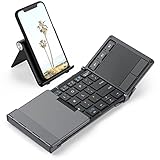
Overview: The iClever BK08 redefines mobile productivity by integrating a precision touchpad into a tri-folding keyboard. Crafted from aircraft-grade aluminum, this 7.05-ounce keyboard transforms tablets and smartphones into laptop-like workstations. Twenty percent smaller than standard travel keyboards, it prioritizes extreme portability while eliminating the need for a separate mouse.
What Makes It Stand Out: The built-in touchpad is the star feature, enabling full cursor control without extra peripherals. This proves invaluable for tablet users who dislike touchscreen navigation. The aluminum construction provides exceptional durability against travel abuse, while the compact design fits pockets that reject bulkier foldables. USB-C charging delivers 60 days of use, and auto-sleep when folded conserves power intelligently.
Value for Money: At $52.99, the BK08 commands a premium over basic foldables but undercuts keyboard-mouse combos. The integrated touchpad justifies the cost for tablet-centric users, though Samsung DeX incompatibility is a notable limitation. If you primarily use iPads or standard Android tablets, this single-device solution offers better value than managing separate accessories.
Strengths and Weaknesses: Strengths:
- Integrated touchpad creates all-in-one mobile workstation
- Premium aluminum build withstands travel wear
- Incredibly lightweight at just 7.05 ounces
- Folds smaller than most competitors for pocketability
Weaknesses:
- Touchpad non-functional with Samsung DeX mode
- 60-day battery shorter than ProtoArc alternatives
- Smaller footprint may compromise key spacing
- No numeric pad limits data entry tasks
Bottom Line: The BK08 excels for tablet users prioritizing minimalism. The touchpad integration makes it a smart choice for mobile professionals, provided you don’t need DeX support.
5. ProtoArc Foldable Compact Keyboard, XK04 Portable Bluetooth Keyboard with PU Leather Cover, Pocket-Sized Wireless Travel Keyboards for iPad, iPhone, Smartphone, Tablet and Laptop - Blue

Overview: The ProtoArc XK04 in blue offers identical functionality to its black counterpart in a more vibrant finish. This two-fold keyboard maintains the same ultra-compact 7.8-ounce design, PU leather cover, and triple Bluetooth connectivity. Targeted at mobile professionals using phones and tablets, it prioritizes portability over extended typing comfort with its palm-sized form factor.
What Makes It Stand Out: Beyond the colorway, the XK04’s two-fold mechanism creates one of the smallest footprints available, easily slipping into jacket pockets. The 150+ day standby time remains class-leading, while the integrated PU leather cover provides protection without adding bulk. Triple device pairing lets you switch between phone, tablet, and laptop seamlessly, making it ideal for brief productivity bursts in coffee shops or during commutes.
Value for Money: Priced at $31.98, the blue variant commands a $6 premium over the black version for purely aesthetic reasons. Functionally identical, this color tax only makes sense if you strongly prefer the blue finish or need color-coding for device organization. At this price point, you’re still getting decent value for ultra-portability, though the black model offers better economics.
Strengths and Weaknesses: Strengths:
- Extremely compact two-fold design for maximum portability
- Exceptional 150+ day battery standby life
- Triple Bluetooth connectivity across devices
- Protective PU leather cover included
Weaknesses:
- Tiny 0.55" keycaps hinder typing accuracy
- Complex Fn-layer shortcuts slow workflow
- Not suitable for extended typing sessions
- Blue color costs more without added features
Bottom Line: Choose the blue XK04 only if color matters to you. For budget-conscious buyers, the identical black version delivers better value for money.
6. ProtoArc Foldable Keyboard with Touchpad, XK01 TP Folding Portable Keyboard, Full Size Keys, Large Trackpad Bluetooth Travel Keyboards for Laptop PC Tablet - Black

Overview: The ProtoArc XK01 TP bridges the gap between portability and productivity with its innovative tri-fold design featuring an integrated multi-touch trackpad. This 88-key Bluetooth keyboard unfolds to a laptop-like 15.19 x 4.68-inch typing surface with generous 16.5mm keycaps, then collapses to a travel-friendly 8.46 x 4.68 inches. Designed for mobile professionals, it includes three Bluetooth 5.1 channels for seamless device switching and comes with a dedicated phone stand and protective PU leather bag.
What Makes It Stand Out: The integrated trackpad eliminates the need for a separate mouse, supporting intuitive gestures for scrolling and navigation. Its intelligent power management delivers an exceptional 120-day standby time, automatically sleeping after 60 minutes of inactivity and powering down completely when folded. The full row of shortcut keys enhances productivity, while the larger-than-average keycaps provide comfortable, accurate typing that rivals traditional laptops.
Value for Money: At $59.99, the XK01 TP sits in the mid-range sweet spot. The inclusion of a trackpad, phone stand, and premium carrying bag adds considerable value over basic folding keyboards. While pricier than entry-level models, the enhanced typing experience and integrated cursor control justify the cost for travelers who frequently work from tablets and smartphones without wanting to carry multiple accessories.
Strengths and Weaknesses: Pros include spacious keycaps, integrated multi-touch trackpad, outstanding battery life, three-device connectivity, and thoughtful accessories. Cons involve non-locking hinges that require flat surfaces, limited trackpad functionality on some iPad apps, and larger folded dimensions than ultra-compact alternatives. iPad users must enable AssistiveTouch, which adds a minor setup step.
Bottom Line: The ProtoArc XK01 TP excels for travelers prioritizing typing comfort and integrated cursor control. Despite minor stability limitations and iOS quirks, its robust feature set and impressive battery life make it a compelling choice for mobile productivity enthusiasts seeking a laptop-like experience in a portable package.
7. ProtoArc Foldable Keyboard and Mouse, XKM01 True Full-Size Folding Bluetooth Keyboard Mouse Combo for Business Travel, a Portable Office Suite On-The-Go, Compatible with Laptop iPad Tablet - Black
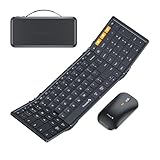
Overview: The ProtoArc XKM01 redefines mobile productivity by delivering a true desktop experience in a foldable form factor. This premium 105-key keyboard features a complete numeric pad and function keys, paired with an ultra-slim precision mouse. The package includes a protective hard case with a built-in tablet stand, creating an instant mobile workstation. Internal aluminum hinges rated for 10,000+ folds ensure durability for frequent travelers who demand reliability.
What Makes It Stand Out: Few folding keyboards offer a genuine full-size layout with a dedicated number pad, making this indispensable for spreadsheet work and data entry. The included mouse features professional-grade 1000/1600/2400 DPI settings and whisper-quiet 25dB micro-switches perfect for shared spaces. Three-device connectivity (2.4G + dual Bluetooth) enables seamless switching between laptop, tablet, and phone with a single click, supporting hybrid workflows across Windows, macOS, Chrome OS, iPadOS, and Android.
Value for Money: At $79.99, this premium combo justifies its price through comprehensive functionality. The durable hard case, precision mouse, and full-size keyboard would cost significantly more purchased separately. For professionals who spend extensive time working remotely, the productivity gains and durable construction deliver excellent return on investment, despite the higher upfront cost.
Strengths and Weaknesses: Pros include true full-size layout with numeric keypad, durable aluminum hinges, professional precision mouse, library-quiet operation, comprehensive accessory kit, and robust multi-device support. Cons are the higher price point, flat non-ergonomic typing surface, lack of locking clips, and slightly larger carrying dimensions. Users with large hands may find the mouse compact.
Bottom Line: The ProtoArc XKM01 is the ultimate portable office suite for serious mobile professionals. Its full-size layout, durable construction, and professional mouse make it worth the premium price. While not the most compact option, it delivers uncompromising productivity for frequent travelers who need desktop-level functionality anywhere.
8. Foldable Bluetooth Keyboard with Touchpad, Ultra-Slim Rechargeable Wireless Travel Keyboard, Full-Size, Premium Leather Texture, Portable Tri-Folding Pocket-Sized for Windows Mac Android iOS

Overview: This ultra-affordable foldable keyboard distinguishes itself with a premium leather texture finish that belies its budget price point. The tri-fold design collapses to a pocket-sized 5.91 x 4.19 inches and weighs merely 184g, making it ideal for style-conscious professionals. Despite its compact dimensions, it offers multi-device Bluetooth 5.1 connectivity, an integrated touchpad, and compatibility across iOS, Android, and Windows platforms for versatile mobile productivity.
What Makes It Stand Out: The leather exterior provides durability and sophistication rarely seen at this price level. Battery performance is exceptional, delivering 45 days of active use on a single two-hour USB-C charge, with 120-day standby time and auto-sleep after 10 minutes. The integrated touchpad supports multi-touch gestures, eliminating the need for a separate mouse during travel and making it a true all-in-one solution.
Value for Money: At $17.49, this keyboard offers remarkable value. Premium materials, integrated touchpad, and multi-device support typically command $40+ from competitors. While the 65-key layout requires function key combinations, the scissor-switch mechanism ensures comfortable, quiet typing. For budget-conscious travelers prioritizing aesthetics and portability, the price-to-feature ratio is outstanding.
Strengths and Weaknesses: Pros include luxurious leather design, incredibly lightweight and compact form, excellent battery life, USB-C fast charging, stable Bluetooth 5.1, and integrated touchpad. Cons involve the reduced 65-key layout lacking dedicated function keys, smaller keys impacting typing speed, limited trackpad gestures on some iOS apps, and potential leather wear over time. No included carrying case is a minor omission.
Bottom Line: This leather-textured keyboard is a steal for style-conscious travelers on a tight budget. While it sacrifices some keys and stability for extreme portability, its premium feel, impressive battery life, and integrated touchpad make it an outstanding value. Perfect for casual mobile typists who prioritize compactness and aesthetics over full-size layout.
9. Foldable Keyboard and Mouse, Samsers Folding Bluetooth Keyboard Combo, 2.4G + BT5.0 x 2, Full-Size Portable Travel Keyboard & USB-C Rechargeable Wireless Mouse for iOS Android Windows Mac OS

Overview: The Samsers folding combo delivers a comprehensive mobile workstation with both keyboard and mouse in a stylish, organized package. The keyboard unfolds to 13.5 x 4.5 inches with standard-sized keys and a numeric keypad, while the contoured mouse provides ergonomic comfort. A sturdy carrying case neatly organizes all components, including a phone holder and charging cable, making it perfect for business trips and mobile offices where organization is paramount.
What Makes It Stand Out: The innovative seamless metal hinge design eliminates gaps between sections, maintaining a familiar layout that enhances typing comfort and accuracy. Three-device connectivity (2.4G + dual Bluetooth 5.0) offers flexible workflow options with stable, lag-free switching. The numeric keypad and multimedia shortcuts with FN lock boost productivity, while the mouse’s adjustable DPI settings adapt to various screen sizes and task requirements.
Value for Money: At $74.99, this mid-premium offering includes everything needed for mobile productivity in one package. The comprehensive kit—keyboard, mouse, case, and phone holder—provides excellent value compared to purchasing items separately. With 90-120 day standby time and durable construction, it justifies the investment for frequent travelers needing reliable, all-in-one solutions.
Strengths and Weaknesses: Pros include standard-sized keys with numeric keypad, ergonomic mouse design, seamless metal hinges, extensive battery life, comprehensive accessory kit, quiet scissor-switch keys, and multi-device support. Cons involve the 21-ounce total weight being heavier than some alternatives, larger folded size limiting pocket portability, and the protective case adding bulk despite its utility.
Bottom Line: The Samsers combo strikes an excellent balance between full-size functionality and portability. Its thoughtful design, comprehensive accessories, and reliable performance make it ideal for business travelers who need a complete typing solution. While not the lightest option, the integrated numeric keypad and ergonomic mouse deliver desktop-level productivity that justifies the price and size.
10. Foldable Keyboard and Mouse, EDJO Folding Wireless Keyboard Mouse Combo with Phone Holder, 2.4G Wireless and Bluetooth, USB-C Rechargeable Portable Combo for iOS Android Windows Mac OS

Overview: The EDJO folding keyboard and mouse combo prioritizes affordability and extreme portability for on-the-go professionals and students. This pocket-sized solution folds down compactly and includes a free phone holder for instant setup anywhere. Supporting three devices simultaneously via 2.4G wireless and Bluetooth, it offers versatile connectivity across Windows, macOS, iOS, and Android platforms, making it universally compatible with virtually any mobile device.
What Makes It Stand Out: At its price point, the inclusion of both keyboard and mouse is remarkable. The 13 multimedia hotkeys provide quick access to common functions, while low-profile scissor keys deliver quiet, stable typing suitable for shared spaces. The USB-C rechargeable battery offers 90 hours of continuous use with intelligent auto-sleep after 10 minutes, maximizing efficiency between charges for short business trips or coffee shop work sessions.
Value for Money: At $29.99, this is one of the most affordable keyboard-mouse combos available. The 12-month warranty, 24-hour email support, and lifetime technical assistance add tremendous peace of mind. While build quality may not match premium brands, the feature set—including multi-device pairing, USB-C charging, and included accessories—makes it an exceptional budget proposition for casual users, students, and occasional travelers.
Strengths and Weaknesses: Pros include unbeatable price, ultra-compact pocket-sized design, included phone holder, USB-C charging, three-device connectivity, comprehensive warranty, and quiet operation. Cons involve shorter 90-hour battery life versus competitors’ weeks-long ratings, basic build quality, smaller keys affecting typing accuracy, and lack of premium materials or carrying case. The mouse may lack precision for detailed design work.
Bottom Line: The EDJO combo is perfect for budget-conscious travelers and students needing basic mobile productivity. While it sacrifices premium materials and extended battery life, its incredible price, compact form factor, and reliable warranty make it a smart entry-level choice. Ideal for occasional use rather than daily heavy typing, it delivers essential functionality without breaking the bank.
The Mobile Professional’s Dilemma: Balancing Portability and Productivity
Why Traditional Keyboards Fail Mobile Workers
The fundamental problem with conventional portable keyboards is that they were never truly designed for mobility. Even “compact” models occupy precious bag space and create awkward bulges in slim laptop sleeves. They force you to choose between typing comfort and travel convenience, and let’s be honest—nobody wants to be that person fumbling with a rigid keyboard in a tight airplane seat. The psychological barrier is just as real as the physical one; when your tools feel cumbersome, you’re less likely to seize spontaneous work opportunities.
The Rise of Foldable Keyboard Technology
Foldable keyboards represent a paradigm shift in mobile input device engineering. By leveraging advanced hinge mechanisms and flexible circuit boards, manufacturers have cracked the code on compressing full-size key spacing into a genuinely pocketable form factor. This isn’t just about making things smaller—it’s about reimagining the entire user journey from packed to productive. The technology has matured dramatically in recent years, moving from fragile prototypes with mushy keys to robust devices that rival traditional keyboards in tactile feedback and reliability.
Understanding Foldable Keyboard Mechanics
Tri-Fold vs. Bi-Fold Designs
The folding architecture you choose dramatically impacts both portability and typing experience. Tri-fold designs compress into remarkably small footprints, often fitting into jacket pockets, but they introduce two hinge points that can affect structural rigidity. Bi-fold models offer a more stable typing platform with a single hinge but typically result in a longer, narrower package when collapsed. Your travel style should dictate this choice: tri-folds excel for ultra-minimalist packers, while bi-folds cater to those who prioritize typing stability over absolute size reduction.
Hinge Engineering and Longevity
The hinge is the heart of any foldable keyboard, yet it’s where most budget models reveal their weaknesses. Premium designs employ metal alloy hinges with precision-machined pivots and reinforced stress points. Look for mechanisms rated for thousands of folding cycles—this spec is rarely advertised but separates travel-worthy tools from disposable gadgets. The best designs incorporate magnetic closure systems that protect the keys when folded and provide satisfying snap-action opening.
Key Layout Configurations
Full-size key pitch (19-19.5mm spacing) is non-negotiable for touch typists, but how manufacturers arrange modifier keys, function rows, and arrow clusters varies wildly. Some designs sacrifice the right-side modifier keys to save space, while others maintain standard layouts at the cost of slightly larger folded dimensions. Consider your workflow: if you live by keyboard shortcuts, prioritize layouts that preserve Ctrl, Alt, and Cmd keys in their traditional positions.
Key Features That Define Premium Foldable Keyboards
Switch Types and Tactile Feedback
Forget the mushy membrane keyboards of yesteryear. Modern foldable keyboards employ scissor-switch mechanisms that deliver crisp, laptop-like key travel around 1.2-1.5mm. Some high-end models even feature low-profile mechanical switches with genuine tactile bumps. The switch choice affects not just feel but noise level—crucial when you’re working in quiet libraries or shared spaces. Test for consistency across the entire key bed; cheaper models often have dead spots near the folds where keys feel noticeably different.
Connectivity Standards: Bluetooth, RF, and USB-C
Bluetooth 5.0 or higher is essential for stable connections and improved battery life, but the real pros look for dual-mode connectivity. Keyboards that offer both Bluetooth and 2.4GHz RF dongles provide backup options when Bluetooth drivers act up. USB-C ports should support both charging and wired mode—a lifesaver when wireless interference is high or batteries die unexpectedly. Some advanced models even feature NFC pairing for instant device connections.
Multi-Device Pairing Capabilities
The ability to switch between three or more paired devices with a single keystroke transforms how you work across ecosystems. Imagine drafting an email on your tablet, switching to your phone to paste a verification code, then jumping to your laptop for heavy editing—all without re-pairing. Premium implementations remember device-specific keyboard layouts, automatically switching between Windows and Mac key assignments.
Battery Technology and Power Management
Lithium-polymer batteries should deliver 40-60 hours of active typing, but real-world usage varies dramatically based on backlighting and connection type. The best models feature auto-sleep functions that wake instantly on key press and provide low-battery warnings at 20% capacity. Solar-assisted charging, while niche, offers peace of mind for outdoor workers. Pay attention to standby time claims—some keyboards can sit unused for months and still retain charge.
Ergonomics on the Go
Travel-Friendly Angles and Stands
Flat typing is ergonomic kryptonite. Quality foldable keyboards integrate adjustable feet or magnetic angle adjustments that create 5-8 degrees of incline. Some designs incorporate device stands that position your tablet or phone at eye level, transforming cramped airplane trays into quasi-ergonomic workstations. The stand mechanism should support devices up to 12.9 inches without wobbling—critical for tablet-first professionals.
Key Spacing and Typing Comfort
Full-size spacing is just the beginning. Key surface area, dish depth, and stabilizer quality determine whether you can maintain 80+ WPM without errors. Look for keys with at least 15mm surface width and subtle concave shaping that cradles fingertips. The spacebar deserves special scrutiny—it should register presses consistently even when struck off-center, a common failure point in compact designs.
Reducing Repetitive Strain Injuries
Mobile work already strains your body; your keyboard shouldn’t add to it. Models with negative tilt options (sloping away from you) reduce wrist extension. Some designs split slightly at the fold, creating an ergonomic splay that mirrors natural hand position. Pair your keyboard with a portable wrist rest—memory foam options that roll up to pen-size exist specifically for this purpose.
Compatibility Across Your Digital Ecosystem
Cross-Platform Support: iOS, Android, Windows, and macOS
Operating system agnosticism is mandatory for modern professionals. Keyboards should automatically detect connected devices and remap modifier keys accordingly. iOS users need Home and Lock screen shortcuts; Android professionals benefit from dedicated app-switching keys. Windows and Mac users require proper Cmd/Option and Windows/Alt mapping. The best models offer companion apps for deep customization of key functions per device.
Shortcut Key Preservation and Customization
Your muscle memory is valuable. Premium foldable keyboards maintain standard shortcut functionality across Ctrl+C, Alt+Tab, Cmd+Space, and similar combos. Advanced users should seek programmable layers—function keys that can be remapped to media controls, app launching, or macro sequences. Some keyboards store these customizations in onboard memory, preserving your settings when switching devices.
Tablet and Smartphone Integration
Modern mobile OSes offer desktop-class features, but only if your keyboard can unlock them. iPadOS supports full keyboard navigation and shortcuts; Android 12+ includes extensive physical keyboard support. Look for keyboards with dedicated screenshot keys, split-screen shortcuts, and cursor control emulation. The ability to trigger voice assistants without touching your device is surprisingly valuable during hands-busy moments.
Beyond the Keyboard: Essential Productivity Tools for Mobile Work
Portable Stands and Holders
A foldable keyboard is only half the equation. Your display—whether tablet, phone, or portable monitor—needs stable positioning. The best stands collapse smaller than a sunglasses case while supporting multiple viewing angles. Consider models with integrated cable management to keep charging cords from creating desk spaghetti. For dual-screen enthusiasts, modular stand systems allow stacking a tablet above your laptop screen.
Compact Mice and Trackpads
Touchscreen fatigue is real. A thumb-sized Bluetooth mouse with adjustable DPI settings provides precision for spreadsheet work and design tasks. For minimalists, flat trackpads that slip into a laptop sleeve offer gesture support without bulk. Some innovative designs combine mouse and presentation clicker functions, perfect for client meetings. Look for devices that share charging cables with your keyboard to reduce adapter clutter.
Power Banks and Charging Solutions
Your keyboard’s battery is useless if your phone dies. A 20,000mAh power bank with USB-C PD can charge your phone, tablet, and keyboard simultaneously. Premium models feature wireless charging pads for topping up earbuds or smartwatches. Consider pass-through charging hubs that let you power multiple devices from a single outlet—crucial in airports with scarce power sources. Solar power banks, while slower, provide indefinite off-grid capability.
Cable Management Systems
A tangled mess destroys the portability promise. Magnetic cable organizers keep USB-C and Lightning cords ready without knots. Retractable cables eliminate loose ends entirely. For the truly organized, color-coded cable ties and labeled pouches ensure you grab the right cord in dim hotel rooms. Some minimalist kits use a single 3-in-1 cable with interchangeable tips for all devices.
Building Your Mobile Office Kit
The Minimalist Setup
The one-bag traveler needs ruthless efficiency: a tri-fold keyboard, a collapsible phone stand, a single 3-in-1 cable, and a slim power bank. This sub-500g kit fits in a jacket pocket yet supports serious work on any flat surface. The philosophy here is device consolidation—your phone becomes your computer, the keyboard provides input, and cloud storage eliminates local file concerns.
The Power User’s Arsenal
For those who can’t compromise on capability, the kit expands: a bi-fold mechanical keyboard, a precision mouse, a tablet stand with height adjustment, a 65W multi-port charger, and a portable monitor. This setup replicates a dual-screen desktop anywhere while still fitting in a standard backpack. The key is modular packing—each component should serve multiple purposes, like a stand that works for both tablet and monitor.
The Creative Professional’s Mobile Studio
Designers and photographers need specialized tools: a keyboard with programmable macro keys, a graphics tablet that folds flat, a color-accurate portable monitor with calibration profiles, and a hub with SD card readers. The keyboard should feature media control dials and customizable shortcut layers for Adobe Creative Suite. Every piece must withstand field conditions—water resistance and dust sealing become priorities.
Durability and Build Quality Considerations
Material Science: From Aluminum to Carbon Fiber
The chassis material determines both weight and resilience. Aircraft-grade aluminum offers excellent rigidity for bi-fold designs but adds 50-100g compared to polycarbonate. High-end tri-folds use carbon fiber composites for strength-to-weight ratio, though at premium prices. The key caps themselves matter—ABS plastic shines initially but develops shine and wear patterns quickly; PBT key caps resist oils and maintain texture for years.
Water and Dust Resistance Ratings
IP ratings aren’t just for rugged phones. IPX4 splash resistance protects against coffee spills in cafes, while IP5X dust sealing prevents pocket lint and debris from gumming up the folding mechanism. The keyboard should have drainage channels and sealed circuit boards. For beach-bound nomads, fully sealed designs with membrane overlays exist, though they sacrifice some key feel.
Warranty and Manufacturer Support
A one-year warranty is standard, but premium brands offer two-year coverage with accidental damage protection. The real value lies in firmware support—manufacturers that regularly update Bluetooth stacks and add OS compatibility extend your keyboard’s useful life by years. Check community forums for responsiveness to bug reports; long-term travelers need manufacturers that stand behind products in remote locations.
Performance Metrics That Matter
Latency and Connection Stability
Bluetooth latency below 30ms is imperceptible for typing but critical for gaming or real-time collaboration. Some keyboards advertise “gaming mode” that prioritizes connection speed over battery life. For video conferencing, stable connections matter more than raw speed—look for adaptive frequency hopping that avoids congested 2.4GHz channels. Wired mode should provide sub-1ms latency for competitive scenarios.
Key Rollover and Anti-Ghosting
6-key rollover (6KRO) is the minimum for touch typing without dropped inputs. N-key rollover (NKRO) over USB is ideal but rare over Bluetooth due to bandwidth constraints. Anti-ghosting ensures random key presses don’t register when you lean your keyboard against something in your bag. Test this by pressing multiple modifier keys simultaneously—cheaper models will register phantom characters.
Backlighting Options for Low-Light Environments
Single-color backlighting suffices for most users, but RGB models allow per-key customization that can highlight shortcut clusters. More importantly, brightness levels should range from dim (for dark flights) to bright (for sunny patios). The best implementations offer adaptive brightness based on ambient light sensors. Backlighting should automatically disable when folded to conserve power.
Price vs. Value: Making Smart Investment Decisions
Budget-Friendly Entry Points
Sub-$50 keyboards get you folding functionality but often compromise on switch quality and hinge durability. They’re perfect for occasional travelers or as backup devices. The sweet spot here is simple: reliable Bluetooth, decent battery life, and a standard layout. Don’t expect multi-device pairing or premium materials, but you can find surprisingly capable options if you prioritize one feature over feature bloat.
Mid-Range Sweet Spots
The $75-150 range is where foldable keyboards hit their stride. You gain proper multi-device switching, aluminum construction, and 40+ hour batteries. This is the category where ergonomics improve dramatically—adjustable feet, better key stability, and thoughtful layout choices appear. For most professionals, this is the price range that delivers 90% of premium performance without diminishing returns.
Premium Features Worth Paying For
Above $150, you’re investing in longevity and specialization. Mechanical switches, carbon fiber construction, solar charging, and advanced programmability justify the cost for daily road warriors. These keyboards often include premium carrying cases, extended warranties, and firmware customization suites. The value proposition isn’t just better typing—it’s reliability when your income depends on getting work done in unpredictable environments.
Real-World Use Cases and Scenarios
Coffee Shop Productivity Sessions
The cafe environment demands quiet operation, compact footprint, and quick setup. Your keyboard should deploy in under 10 seconds and sit stable on uneven wooden tables. Backlighting helps in dim corners, but you need the ability to disable it to conserve battery during long sessions. Pair with noise-canceling earbuds and a laptop privacy screen to create a focused bubble in a chaotic space.
Airplane Tray Table Workstations
Economy class is the ultimate stress test. Your folded keyboard must fit in your seatback pocket, and the opened device can’t exceed 10 inches in depth. Bi-fold designs often work better here, as tri-folds can be too wide for the narrow space. The stand should support your phone at a viewing angle that works when the seat in front reclines. Consider keyboards with airplane mode that disables RF to comply with flight regulations.
Co-working Space Hot-Desking
Shared desks mean competing with ambient noise and varying desk heights. A keyboard with adjustable feet helps match any setup, and durable construction withstands being tossed in lockers. Multi-device pairing shines here—connect to your phone for MFA codes while typing on your laptop. Some co-working spaces have unreliable Wi-Fi, making RF dongles more reliable than Bluetooth.
Digital Nomadism and Extended Travel
Months on the road expose gear to humidity, temperature swings, and constant vibration. Prioritize IP-rated designs and hard-shell carrying cases. Solar charging becomes practical when you’re off-grid. The ability to repair or replace individual key caps extends lifespan when you’re thousands of miles from retailers. Consider keyboards with universal voltage support for charging in countries with different electrical standards.
Maintenance and Care for Longevity
Cleaning Folded Mechanisms
Lint and debris collect in hinge crevices, eventually causing sticky folding action. Use compressed air with a thin nozzle to blow out particles weekly. For deeper cleaning, isopropyl alcohol on a cotton swab dissolves oils without damaging plastic. Never use water near the hinge electronics. Some designs allow partial disassembly for thorough cleaning—check manufacturer guides before attempting.
Battery Health Optimization
Lithium batteries degrade faster when kept at 100% charge. For long-term storage, charge to 60-70% and power off the keyboard completely. Avoid letting batteries drain to zero regularly; most devices have protection circuits, but deep discharges stress cells. If your keyboard supports it, enable battery health modes that limit maximum charge to 80% for daily use, extending overall lifespan by years.
Storage Best Practices
Always fold keyboards with the keys facing inward to protect against impacts. Use the included carrying case—even minimal padding prevents hinge damage from keys pressed during transit. Store in a cool, dry place; glove compartments and hot car interiors can warp plastic components. For humid climates, toss a silica gel packet in the storage pouch to prevent moisture buildup on circuit boards.
Troubleshooting Common Issues
Connectivity Dropouts and Interference
Bluetooth signals weaken when batteries drop below 20%. If connections become unstable, check for interference from USB 3.0 ports, which emit noise in the 2.4GHz band. Move your keyboard closer to the device or switch to wired mode. Some keyboards have reset procedures involving holding specific key combinations during power-on—consult documentation before assuming hardware failure.
Unresponsive Keys and Ghosting
Keys near folds can become less responsive over time. This often indicates debris under the key cap rather than switch failure. Remove key caps carefully with a puller and clean the scissors mechanism. If entire rows fail, the flexible PCB may have cracked at the fold—this requires professional repair. Ghosting usually stems from low battery voltage; replace or recharge before panicking.
Firmware Updates and Driver Conflicts
Manufacturers occasionally release firmware that improves Bluetooth stability or adds OS compatibility. Update through companion apps, never during important work. Driver conflicts occur when multiple keyboards are paired—Windows may assign the wrong layout. Remove all keyboards from Device Manager and re-pair one at a time. macOS users should check System Preferences > Keyboard > Modifier Keys to ensure proper mapping after updates.
Future Trends in Mobile Input Devices
AI-Powered Predictive Typing
Next-generation keyboards will integrate on-device AI that learns your writing patterns and pre-loads likely words, reducing keystrokes by 15-20%. These systems will work offline for privacy and sync across devices via encrypted channels. Expect to see dedicated AI suggestion keys that appear contextually based on your current app and writing style.
Solar and Kinetic Charging
Perovskite solar cells are making their way into keyboard bezels, providing trickle charging under indoor lighting. Kinetic energy harvesting from key presses could soon supplement batteries, with each keystroke generating micro-watts. Combined, these technologies may create keyboards that never need plugging in for typical use—a game-changer for backpackers and field researchers.
Modular and Expandable Systems
The future is modular: keyboards with detachable number pads that magnetically attach to either side, customizable macro modules that snap into place, and even interchangeable switch plates that let you swap between mechanical and scissor feels. These systems will use pogo-pin connections for data and power, allowing you to build your ideal layout for each trip without buying multiple keyboards.
Frequently Asked Questions
How durable are foldable keyboards compared to regular portable keyboards?
Foldable keyboards can actually be more durable in transit because their design protects keys when collapsed. The critical factor is hinge quality—premium models use metal pivots rated for 20,000+ folds, outlasting many traditional keyboards’ lifespan. However, they can be more vulnerable to torsional stress when open, so avoid twisting motions. With proper care, a high-quality foldable keyboard typically lasts 3-5 years of daily travel use, matching or exceeding standard portable keyboards.
Can I really type at full speed on a foldable keyboard?
Absolutely, but with caveats. After a 2-3 day adjustment period, most touch typists return to 90-95% of their normal speed on premium foldable keyboards with full-size key pitch. The learning curve involves trusting the stability of the hinge and adjusting to potentially firmer key presses near fold lines. Models with scissor switches or low-profile mechanical keys feel remarkably similar to laptop keyboards. The key is choosing a design that matches your typing style—heavy typists should avoid ultra-thin models with short travel distances.
What’s the average battery life I should expect?
Real-world battery life varies from 30 to 80 hours of active typing, with most quality models averaging 40-50 hours. Backlighting can reduce this by 60-70%, so disable it when not needed. Standby time is more impressive—most keyboards last 3-6 months powered off. For context, 40 hours equals roughly two weeks of typical mobile work (3-4 hours daily). Solar-assisted models extend this indefinitely under regular indoor lighting. Always verify if manufacturer claims are based on backlight-off usage to avoid disappointment.
Will a foldable keyboard work with my tablet and phone simultaneously?
Yes, if you choose a model with multi-device pairing (usually indicated as supporting 2-3 devices). These keyboards store pairing information for each device and let you switch instantly via dedicated keys (often labeled 1, 2, 3). The magic happens when you can be typing on your iPad, receive a text on your phone, hit the switch key, reply, and switch back without breaking flow. Ensure your devices support the same Bluetooth version (5.0+) for the smoothest experience, and note that some advanced features may only work with certain OS combinations.
Are foldable keyboards allowed in carry-on luggage?
TSA and international security agencies treat foldable keyboards as standard electronic devices—perfectly permissible in carry-on and checked bags. However, never pack them in checked luggage due to rough handling risks. For flights, the compact size is actually an advantage: they fit easily in personal items and don’t count toward your electronic device limit. Some airlines’ “electronics must be powered on if requested” rule applies, so ensure your keyboard is charged before security. Pro tip: keep it in an easily accessible pocket for quick removal if agents want a closer look.
How do I clean crumbs and debris from the folding mechanism?
First, turn the keyboard upside down and gently tap it to dislodge loose debris. Use compressed air with a narrow nozzle, directing bursts parallel to the hinge line rather than straight in. For stubborn particles, a soft-bristled brush (like a clean makeup brush) works wonders. Never insert metal tools into the hinge. If keys are sticky, remove keycaps with a proper puller and clean the scissor mechanism with isopropyl alcohol. Avoid using water or harsh cleaners, which can damage the flexible PCB. Clean monthly if you eat while working.
Do foldable keyboards feel “mushy” or cheap when typing?
Early models earned this reputation, but modern premium keyboards have closed the gap significantly. Scissor-switch designs in the $75+ range deliver crisp, consistent action that rivals mid-range laptops. The key is switch quality and key cap stability—well-designed models have minimal wobble and firm bottom-out. Mechanical foldable keyboards exist for those wanting definitive tactile feedback. Read user reviews focusing on “key feel” rather than just features. If possible, test in-store by typing a full paragraph; mushiness becomes apparent within the first few sentences.
What’s the biggest size compromise with foldable designs?
The main trade-off is thickness when folded—premium models are 15-20mm thick, about like a small paperback. This is actually slimmer than many “portable” rigid keyboards. The real compromise is often the function row: many designs compress F-keys into a shared row with modifiers, requiring Fn combinations. Some also shrink the right Shift key, which can frustrate touch typists. Arrow key layouts vary wildly; full-size inverted-T arrows are rare, with many using a compact linear arrangement. Decide which keys you can live without before buying.
Can I use a foldable keyboard for gaming or creative work?
For casual gaming, yes—especially models with low latency and anti-ghosting. Don’t expect competitive esports performance; even the best foldable keyboards lack the ultra-fast polling rates of gaming keyboards. For creative work, they’re excellent: programmable macro keys streamline Photoshop shortcuts, and precise key feel benefits audio/video editing timeline navigation. The limiting factor is often lack of dedicated media controls and number pads. Some artists pair foldable keyboards with separate macro pads for the best of both worlds.
How do I know if a foldable keyboard will be comfortable for my typing style?
Consider your typing force and finger length. Heavy typists need keyboards with firm key plates that don’t flex during aggressive typing—test this by pressing hard on the center keys. If you have larger hands, verify the key spacing isn’t just “full-size” but also maintains standard staggered columns; some designs subtly compress horizontal spacing. Check if the keyboard sits flat when open—some warp slightly at the hinge, creating an uneven typing plane. Finally, assess your pain points: if you get wrist pain, prioritize models with negative tilt or plan to add a portable wrist rest. Most discomfort appears within the first week of use, so buy from retailers with generous return policies.'