Your desk is a battlefield of charging cables. One brick for your laptop, another for your phone, a wireless pad for your smartwatch, and maybe even a dedicated adapter for your earbuds. It’s a modern-day hydra of power adapters that clutters your space and complicates your life. Enter the GaN revolution—compact, multi-port chargers that can genuinely replace your entire charging arsenal with a single, intelligent device. These aren’t the underpowered multi-port bricks of yesterday that trickle-charged everything slowly. Today’s Gallium Nitride chargers deliver laptop-grade power alongside simultaneous high-speed phone and watch charging, all while fitting in your palm.
But here’s the catch: not all GaN chargers are created equal. The market is flooded with options boasting impressive specs that don’t hold up in real-world use. Some promise 100W total output but deliver a fraction of that to the ports that matter. Others claim “fast charging” but lack the sophisticated power negotiation protocols your premium devices demand. Understanding the nuances of power distribution, port architecture, and certification standards isn’t just technical jargon—it’s the difference between a charger that transforms your workflow and one that leaves you frustrated and underpowered. Let’s decode what makes a multi-port GaN charger truly capable of handling your laptop, phone, and watch simultaneously.
Top 10 Multi-Port GaN Chargers for Laptop Phone and Watch
Detailed Product Reviews
1. ELECOM 120W USB C Wall Charger Block, 3 Multi Port GaN II Smart PD, Ultra-Fast Charging, Compact Power Adapter for Multiple Devices, Laptops, Tablets, iPhone, iPad, Watch, Speakers, Airpods - Black
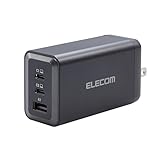
Overview: The ELECOM 120W USB C Wall Charger Block delivers high-performance charging in a remarkably compact form factor. Leveraging GaN II technology, this three-port adapter provides efficient power delivery for laptops, tablets, smartphones, and accessories simultaneously. Its sleek black design houses two USB-C ports and one USB-A port, making it a versatile solution for modern multi-device users who need reliable charging without the bulk of traditional adapters.
What Makes It Stand Out: This charger’s GaN II architecture sets it apart, offering superior power density and thermal management compared to silicon-based alternatives. The intelligent Power Delivery system with PPS technology automatically optimizes charging output for each connected device, ensuring both speed and safety. The comprehensive Multi-Protect safety system includes temperature detection, short circuit, overload, and overvoltage protection—features rarely seen at this price point. Its broad compatibility spans across Apple, Samsung, Google, and major laptop brands.
Value for Money: At just $13.49, this charger represents exceptional value. Most GaN II chargers with similar wattage cost twice as much. You’re getting advanced safety features, intelligent power distribution, and premium build quality for budget pricing. For users needing to charge a laptop plus two smaller devices, it outperforms many $30+ competitors while maintaining the same reliability and efficiency standards.
Strengths and Weaknesses: Strengths include ultra-compact design, advanced GaN II efficiency, robust safety protections, intelligent PD/PPS charging, and outstanding affordability. The 120W total output adequately powers a laptop and peripherals simultaneously. Weaknesses are the limited three-port configuration, which may constrain power users with many devices, and the 120W ceiling that requires careful power management when charging multiple high-draw devices like two laptops.
Bottom Line: The ELECOM 120W charger is an outstanding choice for professionals and travelers seeking premium GaN II performance without the premium price tag. Its combination of intelligent charging, comprehensive safety, and remarkable value makes it highly recommended for anyone with a moderate device collection.
2. USB C Charger Block 200W 6 Port GaN Fast Charging Station Hub for Laptop, iPad, iPhone 17 Pro Max Fast Charger Pixel DELL MacBook Pro/Air Galaxy S25 Steam Deck USB C 100W Adapter for Android

Overview: This 200W GaN charging station delivers substantial power across six ports, making it ideal for tech-heavy households and offices. With one 100W USB-C port, two 30W USB-C ports, and three 18W USB-A ports, it can simultaneously charge a laptop, tablet, phone, and accessories. The integrated 1.5-meter power cable adds flexibility for desk placement, while its compact design ensures it doesn’t dominate your workspace.
What Makes It Stand Out: The 200W total output distinguishes this hub, allowing genuine multi-device fast charging without dramatic speed reductions. The strategic port arrangement—featuring a dedicated high-power 100W USB-C for laptops—ensures your primary device gets priority charging. The extended power cord solves a common pain point with wall chargers, letting you position the hub conveniently rather than being tethered to an outlet. Universal compatibility covers everything from Steam Deck to MacBook Pro.
Value for Money: Priced at $24.99, this charger delivers remarkable cost-per-port value. Purchasing individual chargers for six devices would easily exceed $60. The 200W capacity ensures you’re future-proofed for power-hungry devices, and the GaN technology maintains efficiency. For families or professionals juggling multiple gadgets, this represents a 60% savings compared to buying separate high-quality chargers.
Strengths and Weaknesses: Strengths include high 200W total output, versatile six-port configuration, generous 1.5m cable, broad device compatibility, and excellent pricing. The hub intelligently manages power distribution and includes comprehensive safety protections. Weaknesses are the single 100W port limiting dual-laptop setups, lower 30W/18W outputs on remaining ports that won’t maximize newer devices’ charging potential, and unspecified GaN generation which may mean slightly less efficiency than latest chips.
Bottom Line: This 200W charging station is a powerhouse for multi-device users, offering exceptional value and flexibility. It’s perfect for households or workstations where several devices need simultaneous charging, though power users with multiple laptops should verify port allocation meets their needs.
3. 800W USB C Charging Station, 120W PD GaN5 Super Fast USB C Charger Block-10 Port, Type C for PC Laptop MacBook Pro/Air Charger Compatible with iPhone 17 16 15 14 13 12 Pro Max, iPad, Galaxy (Black)

Overview: This Roruite charging station redefines multi-device power delivery with an unprecedented ten-port configuration and cutting-edge GaN5 technology. Five dedicated 120W USB-C ports enable simultaneous super-fast charging for multiple laptops, while four 30W USB-A and one additional 30W USB-C port handle phones, tablets, and accessories. The compact black unit includes a 5-foot heavy-duty cable, making it a formidable solution for power users, families, or small offices managing extensive device ecosystems.
What Makes It Stand Out: The five 120W ports represent a game-changing feature—no other consumer charger offers this many high-wattage outputs, allowing you to fast-charge several MacBooks or premium laptops concurrently. GaN5 chip technology delivers maximum efficiency with minimal heat generation. The intelligent power distribution system automatically formulates optimal charging plans for connected devices, while six-layer safety protection includes 24/7 temperature monitoring. The space-saving design works flat or upright, perfect for cluttered desks or travel.
Value for Money: At $49.99, this station delivers professional-grade capabilities at a fraction of enterprise alternatives costing $200+. The per-port cost is under $5 for 120W charging—unmatched in the market. For households with multiple laptops or creators running several power-hungry devices, it replaces five individual chargers, saving over $150 while reducing cable clutter and outlet congestion.
Strengths and Weaknesses: Strengths include revolutionary five 120W ports, GaN5 efficiency, comprehensive six-layer safety, versatile orientation options, and exceptional multi-laptop charging capability. The 800W total capacity future-proofs any setup. Weaknesses include potential overkill for users with fewer than three high-power devices, the $49.99 price may exceed casual user budgets, and the sheer number of ports requires intentional cable management to avoid desk chaos.
Bottom Line: This charging station is a powerhouse solution for serious tech enthusiasts, multi-device families, and small business environments. If you regularly charge three or more laptops or high-draw devices, its unmatched port array and GaN5 performance justify every penny, making it the ultimate charging command center.
4. 460W USB C Charger Block, 10-Port Charging Station GaN Fast Charger Block Type C & USB A Wall Charger, Dual 65W Laptop Multiport for iPhone 17, iPad, MacBook Pro/Air, Samsung Galaxy, Android(Grey)

Overview: This Roruite 460W charging station balances high capacity with intelligent power allocation across ten ports. Featuring six USB-C and four USB-A connections, it prioritizes dual 65W ports specifically engineered for simultaneous laptop charging. The GaN III architecture ensures efficient power conversion while maintaining a compact footprint suitable for desk or travel use. Grey finish and robust construction signal professional-grade equipment for demanding multi-device environments.
What Makes It Stand Out: The dual dedicated 65W ports with PPS support for Samsung’s 45W Super Fast Charging differentiate this hub for two-laptop households. Unlike competitors that share power across all ports, this design guarantees two devices receive full laptop-level charging concurrently. GaN III technology represents the current efficiency standard, while the six-layer safety system provides enterprise-level protection. The lifetime service commitment demonstrates manufacturer confidence rarely seen in charging accessories.
Value for Money: At $51.99, this charger targets users specifically needing dual laptop capability. While Product 3 offers more raw wattage per port, this unit’s optimized dual 65W configuration may better serve users with exactly two primary devices. It replaces two $30 laptop chargers plus a multi-port hub, delivering 40% savings. The lifetime service adds intangible value, potentially saving replacement costs for years.
Strengths and Weaknesses: Strengths include purpose-built dual 65W laptop ports, GaN III efficiency, comprehensive ten-port flexibility, robust safety protections, and exceptional lifetime service guarantee. The 460W total output realistically supports continuous dual-laptop use plus accessories. Weaknesses include higher cost-per-port than alternatives, 65W maximum may not satisfy users with 100W+ laptops, and the power distribution complexity requires consulting specifications to avoid port-selection mistakes.
Bottom Line: This charging station excels for dual-laptop users who need guaranteed simultaneous full-speed charging. Its dual-port focus, GaN III efficiency, and lifetime service make it a smart investment for professionals, though those with three or more high-power devices should consider alternatives with more high-wattage ports.
5. USB C Charger, 240W GaN 8 Port USB Fast Block, PD100W Multi-Port Charging Station, Power Adapter Plug for Samsung/iPhone/Google, Laptop Charger for MacBook Pro/Air

Overview: This 240W GaN charging station delivers balanced power distribution across eight ports, centering on a robust 100W USB-C connection for primary laptops. Four USB-C and four USB-A ports provide versatile charging options for phones, tablets, and accessories. The innovative vertical stand design with a lower support base ensures stability while saving desk space. A 1.5-meter cable and compact form factor make it equally suitable for home, office, or travel use.
What Makes It Stand Out: The standout feature is the 100W port’s ability to maintain full output even when all eight ports are active—a rarity in multi-port chargers where power typically gets shared and diluted. The vertical orientation is genuinely useful for crowded desks, keeping cables organized and accessible. The symmetrical four/four port split offers perfect flexibility for mixed device ecosystems, while GaN technology keeps temperatures low despite the compact size.
Value for Money: Priced at $25.99, this charger hits a sweet spot between capacity and affordability. You’re getting 240W total distribution, dedicated 100W laptop charging, and eight ports for roughly $3.25 per port. It effectively replaces a $40 laptop charger plus a $20 multi-port hub, offering 35% savings while reducing clutter. For users with one primary laptop and multiple smaller devices, this represents optimal cost-to-utility ratio.
Strengths and Weaknesses: Strengths include dedicated 100W port that doesn’t share power, innovative vertical stand design, excellent eight-port versatility, comprehensive safety protections, and strong value proposition. The 240W total capacity handles a laptop plus numerous accessories simultaneously. Weaknesses include only one high-wattage port limiting dual-laptop scenarios, remaining USB-C ports capped at 30W which underutilizes newer devices’ capabilities, and unspecified GaN generation may lag behind latest efficiency standards.
Bottom Line: This charging station is ideal for users centered around one primary laptop who also maintain several secondary devices. Its vertical design, dedicated 100W output, and balanced port array make it a top choice for decluttering desks while ensuring your main device always charges at maximum speed.
6. 300W Charging Station for Multiple Devices Apple,10 in 1 Wireless Charger for iPhone,GaN III USB C 65W PD Fast Charging Stand Dock for MacBook,iWatch&Airpods (Wireless Charging Only for Apple)

Overview: This 10-in-1 charging station combines a 7-port USB charging hub with a 3-in-1 wireless charging pad, delivering 300W total output. Designed for mixed-device households, it features dual 65W USB-C ports for laptops, plus additional USB-C and USB-A ports for phones, tablets, and accessories. The wireless section exclusively serves Apple devices—iPhone, Apple Watch, and AirPods—while the wired ports handle virtually any USB-powered gadget.
What Makes It Stand Out: The hybrid approach sets this apart, merging dedicated Apple wireless charging with high-wattage USB ports. GaN III technology enables efficient power delivery in a compact footprint, while intelligent power distribution ensures optimal charging across all devices simultaneously. The non-slip base and subtle LED indicators add thoughtful practicality for desk use.
Value for Money: At $41.99, this station offers compelling value. Competing products with similar wattage and wireless capability typically cost $60+. You’re essentially getting two devices in one: a capable laptop charger and an Apple wireless dock, making it economical for users invested in both ecosystems.
Strengths and Weaknesses: Pros include versatile 10-in-1 design, robust 300W output, GaN III efficiency, comprehensive safety protections, and Apple-specific wireless charging. Cons: wireless functionality is Apple-only, limiting flexibility, and the confusing note about a non-charging USB-C port on the watch stand may cause initial setup frustration. The power distribution could also be limiting if running all ports at maximum simultaneously.
Bottom Line: An excellent solution for Apple users who also charge non-Apple devices. It declutters your desk while delivering ample power, though pure Android households should consider alternatives without the Apple wireless premium.
7. 880W USB C Charger Block Charging Station 8 Port Fast Chager 140W PD PPS AVS HUB Laptop MacBook Charger Compatible with All iPhone 17 Pro Max/17 Air/16 SE/Samsung Galaxy 25/ MacBook Pro/Air/iPad Pro

Overview: This powerhouse charging station delivers an impressive 880W across eight ports, positioning itself as a complete desktop power solution. With five USB-C ports (including dual 140W PD PPS outputs) and three USB-A ports, it promises to handle everything from MacBook Pro laptops to smartphones simultaneously. The GaN-based design supports universal compatibility across Apple, Samsung, and other major brands.
What Makes It Stand Out: The sheer wattage is unprecedented in this price class—880W exceeds most residential power needs. The 140W PD PPS ports with AVS (Adjustable Voltage Supply) offer future-proofing for next-generation devices. ActiveShield technology provides continuous temperature monitoring, while the hub functionality suggests data passthrough capabilities.
Value for Money: At $64.99, the wattage-to-dollar ratio is exceptional. Traditional 100W chargers cost $40-50; this offers nearly 9x the power for just a modest premium. However, the value depends on actually needing this capacity—most users will never tap its full potential.
Strengths and Weaknesses: Pros include massive 880W output, cutting-edge 140W PD PPS support, comprehensive compatibility, and advanced safety monitoring. Cons: the 880W claim may be optimistic given the size and thermal constraints, likely requiring careful power management. It’s probably overkill for average users and may generate significant heat under full load. The “HUB” branding is ambiguous about data capabilities.
Bottom Line: Ideal for power users running multiple high-wattage devices like laptops, monitors, and workstations simultaneously. For typical phone/tablet charging, it’s unnecessary overkill—invest in a lower-wattage option instead.
8. USB C Charger Block,65W 6-Port USBC Charging Block,Wall Charger iPhone Charger Fast Charging,Multiport Type C PD+QC Power Plug for All iPhone 17 16 15 iPad Samsung S23 S24 iWatch Pixel Series (White)

Overview: This ultra-compact 65W charging block packs six ports into a minimalist white design, offering an affordable entry point to multi-device charging. With three USB-C and three USB-A ports, it supports simultaneous charging for phones, tablets, and accessories. GaN technology keeps it running cool despite its small size, while universal compatibility covers everything from iPhone 17 to Samsung Galaxy and Pixel devices.
What Makes It Stand Out: The $9.99 price point is remarkable—this is among the cheapest GaN chargers available. The 6-port configuration in such a tiny form factor makes it perfect for travel or outlet-starved environments. Quick Charge 3.0 and Power Delivery support provide respectable speeds for phones, promising 0-65% iPhone charging in 30 minutes.
Value for Money: Exceptional. Comparable 65W GaN chargers with fewer ports retail for $25-35. You’re getting six ports and modern fast-charging protocols at a fraction of the cost, making it a low-risk purchase for budget-conscious buyers.
Strengths and Weaknesses: Pros include unbeatable price, compact GaN design, six-port versatility, and broad device compatibility. Cons: 65W total power is modest—charging multiple devices simultaneously throttles speeds, making it unsuitable for laptops beyond trickle charging. The 30W per USB-C port is adequate but not exceptional, and build quality may reflect the price point. No cable included.
Bottom Line: Perfect for charging phones, tablets, and accessories on a budget. Don’t expect to power laptops or charge multiple devices at maximum speed, but as a compact travel or bedside charger, it’s an absolute steal.
9. 200W Charging Station for Multiple Devices, 8-Port USB C Charger Block Fast Charging, 65W Type C GaN Power Adapter for Cellphones, Tablets, Laptops, Multi Chargers USB Hub Flat Plug

Overview: This 200W charging station balances power and practicality with its eight-port design and thoughtful physical features. Four USB-C and four USB-A ports provide flexible connectivity, while the 65W PD capability handles most laptops. The flat plug, braided power cord with integrated switch, and optional wall/desk mount make it exceptionally user-friendly for permanent installations.
What Makes It Stand Out: The industrial design distinguishes this from generic blocks. The flat plug hugs walls in tight spaces, the on/off switch eliminates reaching for outlets, and the rotatable mount adds installation versatility. These practical touches show real-world consideration beyond just port count and wattage.
Value for Money: At $32.65, it sits in the sweet spot between budget and premium options. You’re paying slightly more than basic models but gaining meaningful quality-of-life features and reliable 200W output. Comparable units without the mounting hardware and braided cable cost $25-30, making the premium justified.
Strengths and Weaknesses: Pros include convenient flat plug design, durable braided cable with switch, mounting versatility, balanced 4x4 port layout, and solid 200W capacity. Cons: 65W maximum per port limits compatibility with high-performance laptops needing 100W+, and the brand lacks the recognition of Anker or UGreen. No wireless charging or advanced GaN generation is mentioned.
Bottom Line: An excellent choice for home office or workspace organization. The mounting options and cable management features make it ideal for permanent setups where convenience matters as much as charging speed.
10. 800W USB C Charging Station, 120W PD GaN5 Super Fast USB C Charger Block-10 Port, Type C Fast Charging Block for PC Laptop MacBook Pro/Air Charger Adapter with iPhone 17 16 15 14 Pro Max, iPad, Galaxy

Overview: Roruite’s flagship charging station delivers 800W across ten ports using advanced GaN5 technology. With six USB-C ports (five delivering 120W super fast charging) and four USB-A ports, it targets power users juggling multiple laptops, tablets, and phones. The intelligent power distribution optimizes charging sequences for maximum efficiency, while universal PD3.1, QC3.0, and PPS protocol support ensures broad compatibility.
What Makes It Stand Out: The 120W output on five simultaneous ports is genuinely impressive—most competitors offer only one or two high-wattage ports. GaN5 technology represents the current efficiency standard, enabling this power in a compact, travel-friendly form factor. Six-layer safety protection with 24/7 temperature monitoring provides enterprise-grade peace of mind.
Value for Money: At $69.99, it’s a premium investment but justified for the specifications. Five 120W ports alone would cost $150+ as individual chargers. For professionals charging multiple laptops or creative workstations, the ROI is clear. Casual users should opt for cheaper alternatives.
Strengths and Weaknesses: Pros include cutting-edge GaN5 efficiency, five 120W simultaneous outputs, comprehensive safety systems, compact travel design, and intelligent power management. Cons: the 800W total may be overkill for typical households, and the premium price excludes budget buyers. Some may find the “3x faster than 65W” marketing misleading since device compatibility varies.
Bottom Line: The ultimate charging station for tech-heavy users, remote professionals, or families with multiple laptops. If you need to fast-charge several high-power devices daily, this is your best-in-class solution.
Why Your Single-Port Charger Is Holding You Back
The single-port charger that came with your laptop was designed for one job and one job only. It doesn’t understand that you’re living a multi-device life where every outlet is precious real estate. When you travel, you’re forced into an impossible choice: which device gets priority? Your work laptop that needs to stay alive for a presentation, or your phone that’s your lifeline for navigation and communication?
Multi-port GaN chargers eliminate this compromise entirely. They leverage Gallium Nitride’s superior efficiency to pack multiple high-power outputs into a form factor smaller than your laptop’s original brick. More importantly, they intelligently manage power distribution, ensuring each connected device receives exactly the voltage and amperage it needs without wasting capacity elsewhere. This isn’t just convenience—it’s a fundamental shift in how we approach powering our digital ecosystem.
Understanding GaN Technology: The Power Revolution
What Makes Gallium Nitride Superior to Silicon
Gallium Nitride represents a generational leap beyond traditional silicon-based chargers. GaN transistors can switch up to 40 times faster while generating significantly less heat. This efficiency translates directly into smaller components, higher power density, and reduced energy loss. For you, this means a charger that doesn’t just work better—it fundamentally changes what’s possible in terms of size and capability.
The thermal advantage is particularly crucial for multi-port designs. Silicon chargers generating 100W+ of output require substantial heat sinks and ventilation, making them bulky and prone to thermal throttling. GaN chargers run cooler under the same load, allowing manufacturers to stack multiple high-power ports in a compact design without risking overheating or performance degradation.
Real-World Impact on Multi-Device Charging
The practical benefit extends beyond just size. Cooler operation means sustained performance. A silicon-based multi-port charger might start strong but throttle power output as internal temperatures rise during a long charging session. GaN chargers maintain consistent output, ensuring your laptop receives its full 65W or 100W from 0% to 100% charge, even while simultaneously fast-charging your phone and watch. This thermal stability is what makes the “charge everything at once” promise actually deliverable.
Decoding Power Requirements: What Your Devices Actually Need
Laptop Power Demands: Beyond the Marketing Numbers
Your laptop’s power adapter rating isn’t just a suggestion—it’s a baseline requirement for optimal performance. A 13-inch MacBook Pro needs 67W to charge while under load. A Dell XPS 15 might demand 90W. Windows-based gaming laptops can require 140W or more. The critical insight is that these numbers represent what’s needed to charge and operate simultaneously. If you’re running processor-intensive tasks while charging, anything less than the full rated power means your battery drains despite being plugged in.
Phone Fast Charging: It’s Not Just About Watts
Modern smartphones negotiate charging protocols with surgical precision. An iPhone 15 Pro can accept up to 27W but only through USB-C PD (Power Delivery) with specific voltage profiles. Samsung’s Galaxy S24 Ultra supports 45W charging but requires PPS (Programmable Power Supply) to hit maximum speeds. Generic “fast charging” without these protocols might deliver a sluggish 10-15W, making your “fast” charger barely faster than a standard USB-A port.
Smartwatch Wireless Charging: The Low-Power Challenge
Smartwatches present a unique challenge: they draw minimal power (typically 2-5W) but require consistent, clean power delivery. Many multi-port chargers treat low-power devices as an afterthought, routing them to underpowered ports that lack proper voltage regulation. This can result in interrupted charging cycles or, worse, damage to the watch’s tiny battery over time. The best GaN chargers dedicate specific circuitry to handle these micro-loads without affecting high-power port performance.
Port Configuration Strategies: Matching Ports to Your Lifestyle
The 2C1A Layout: The Modern Standard
The most versatile configuration features two USB-C ports and one USB-A port. This setup acknowledges the reality that while USB-C is the future, you likely still have legacy devices—Bluetooth headphones, older Kindles, or fitness trackers—that require USB-A. The key is understanding power distribution: does the second USB-C port maintain high wattage when both are used, or does it drop to a disappointing 15W?
All-C Configurations: Future-Focused Simplicity
Premium chargers are increasingly adopting three or four USB-C ports with no USB-A. This design assumes you’ve fully transitioned to USB-C or are willing to use small adapters for legacy devices. The advantage is cleaner power allocation and often higher total output, as manufacturers don’t need to maintain separate USB-A circuitry. For Apple-centric users with MagSafe chargers and USB-C phones, this is often the optimal path.
Dedicated Wireless Charging Pads: Integration vs. Separation
Some GaN chargers integrate a wireless charging pad directly into the unit. While convenient, this design choice impacts thermal management and port placement. A separate wireless pad connected via USB gives you flexibility in positioning but consumes one of your valuable ports. Integrated solutions keep ports free but may throttle wireless charging speed when the primary USB-C ports are under heavy load.
Wattage Wars: How Much Power Do You Really Need?
Calculating Your Simultaneous Load
The math is straightforward but often overlooked. Add up the maximum power each device needs: 67W for your laptop, 25W for your phone, 5W for your watch, and maybe 15W for earbuds. That’s 112W total. But here’s the nuance: devices rarely charge at maximum simultaneously. Your phone slows charging above 80% battery. Your laptop might need only 30W once topped up. A 100W charger with intelligent power allocation often handles this mix better than a “120W” charger with fixed port outputs.
The 65W vs. 100W vs. 140W Decision Tree
65W chargers excel for ultrabook users (MacBook Air, Surface Laptop) and represent the sweet spot for portability. 100W units handle most 14-16" productivity laptops while leaving 30W for phones and accessories. 140W+ chargers target creative professionals with power-hungry machines, but often at the cost of size and heat. The mistake is buying more wattage than your devices can actually use—wasted capacity that adds bulk without benefit.
Advanced Power Delivery Protocols: Beyond Just “Fast Charging”
USB-C PD 3.0 and 3.1: The Foundation
Power Delivery 3.0 introduced PPS, which allows dynamic voltage adjustment in 20mV steps. This precision reduces heat in your device’s battery, extending its lifespan. PD 3.1 extends this to 240W for future devices. A charger advertising “PD 3.0” without PPS support is already outdated for Samsung users and suboptimal for iPhone fast charging.
PPS (Programmable Power Supply): The Secret to True Fast Charging
PPS is what separates premium chargers from pretenders. It allows real-time communication between charger and device, adjusting voltage and current to match the battery’s exact needs at every charging stage. Without PPS, you’re stuck with fixed voltage profiles (5V, 9V, 15V, 20V) that force your device to waste energy as heat. With PPS, a Galaxy phone can receive exactly 10.5V at 4.3A (45W) instead of being forced into an inefficient 15V/3A profile.
QC4+ and Legacy Protocols: Backward Compatibility Matters
While USB-C PD dominates, some devices still use Qualcomm Quick Charge or proprietary protocols. A truly versatile GaN charger detects and adapts to these legacy standards on its USB-A ports while maintaining PD on USB-C. This backward compatibility ensures your older devices charge at maximum speed without forcing you to keep obsolete chargers around.
Safety First: Non-Negotiable Protection Features
Over-Current and Over-Voltage Protection
Quality GaN chargers continuously monitor each port’s output, instantly cutting power if a device draws more current than negotiated or if voltage spikes occur. This isn’t just about protecting the charger—it’s about preventing catastrophic damage to your $2,000 laptop or $1,000 phone. Look for chargers that list individual port protection rather than just a master fuse.
Thermal Management and Fire Safety
GaN runs cooler, but multi-port chargers still generate significant heat under full load. Premium designs use graphene heat sinks, thermal pads, and intelligent fanless cooling that distributes heat across the entire chassis. UL certification (or equivalent) isn’t optional—it’s your guarantee the charger won’t become a fire hazard when pushed to its limits for hours.
Certification Standards You Should Demand
UL 62368-1, CE marking, FCC compliance, and USB-IF certification aren’t bureaucratic checkboxes—they’re rigorous testing standards that ensure safety and interoperability. A charger lacking these certifications might work fine initially but could fail catastrophically under edge cases like voltage fluctuations or extreme temperatures. Reputable manufacturers publish certification numbers you can verify.
Size Matters: Balancing Portability with Performance
The Pocketability Threshold
The best travel GaN chargers hit a sweet spot: smaller than a credit card and lighter than your phone while delivering 65-100W. The Anker Nano series and similar designs prove this is achievable. However, extreme miniaturization can compromise port spacing—cables may block adjacent ports. The ideal design balances compactness with practical port placement.
Wall-Mount vs. Desktop Configurations
Wall-mount chargers plug directly into outlets, eliminating cable clutter but potentially blocking adjacent sockets. Desktop versions use a separate power cord, offering flexibility in placement and better weight distribution for heavy cables. For hotel rooms with scarce outlets, wall-mount designs win. For stable desk setups, the desktop form factor provides a cleaner aesthetic.
Cable Management and Port Accessibility
Consider port orientation. Side-facing ports work better in tight spaces behind furniture. Top-facing ports keep cables organized on a desk but can accumulate dust. The best designs include subtle LED indicators that confirm active charging without lighting up your entire room at night.
The Price-Value Equation: Investing Wisely
The $30 vs. $80 vs. $150 Price Tiers
Budget GaN chargers ($30-50) often cut corners on PPS support, use lower-grade capacitors, and lack individual port protection. Mid-range options ($60-90) typically offer the best value: full protocol support, robust safety features, and reliable warranties. Premium chargers ($100+) justify their cost with higher wattage, superior thermal design, and brand reputation—but only if you need those specific capabilities.
Warranty and Customer Support Reality Check
A two-year warranty is the industry standard for quality GaN chargers. Brands offering only 12 months are signaling lower confidence in their product’s longevity. More importantly, investigate the warranty process: do they require you to ship the defective unit back at your cost? Do they offer advance replacement? The best brands stand behind their products with hassle-free support.
Total Cost of Ownership: One vs. Many
Calculate the cost of three separate quality chargers (laptop, phone, watch) versus one premium GaN unit. The multi-port charger often costs less while delivering a superior user experience. Factor in the value of outlet real estate and reduced cable clutter, and the economic argument becomes compelling even before considering travel convenience.
Brand Trust and Certification: Avoiding Counterfeit Risk
The Amazon Marketplace Problem
Major e-commerce platforms are flooded with GaN chargers bearing fake certifications and inflated specs. A “100W” charger might deliver only 60W total across all ports. Look for brands that sell direct from their own stores or through authorized retailers. Check for verifiable UL certification numbers and USB-IF membership.
Red Flags in Product Listings
Vague specifications like “supports fast charging” without listing specific protocols (PD 3.0, PPS, QC4+) are immediate warning signs. Legitimate manufacturers publish detailed power distribution charts showing exactly how wattage is allocated when multiple ports are active. If you can’t find this information, the product likely has something to hide.
Community Validation and Professional Reviews
Before purchasing, search for teardown reviews on sites like ChargerLAB or professional testing on YouTube channels that use actual load testers. These independent analyses reveal whether a charger meets its specs under real-world conditions. User reviews mentioning “gets hot” or “charges slower than expected” are canaries in the coal mine.
Common Buying Mistakes That Leave You Underpowered
Mistake #1: Trusting “Total Output” Numbers
A charger advertising “100W total output” might deliver 65W on USB-C1, but only 15W on USB-C2 and USB-A when all ports are active. Always check the simultaneous output specifications, not just the peak single-port rating. The devil is in the distribution details.
Mistake #2: Ignoring Cable Quality
Your $80 GaN charger is only as good as your cable. A subpar USB-C cable can limit power delivery to 60W even if the charger supports 100W. Ensure your cables are USB-IF certified and rated for the wattage you need. For 100W+ charging, you need E-Marker chips in the cable that actively communicate capabilities.
Mistake #3: Overlooking Standby Power Draw
Cheap chargers can draw 0.5W or more in standby mode, slowly draining power 24/7. Quality GaN chargers implement low standby power (<0.1W) and intelligent port detection that only activates full power when a device is connected. This isn’t just eco-friendly—it adds up to measurable savings on your electricity bill over the charger’s lifetime.
Future-Proofing Your Purchase: What Matters in 2024 and Beyond
USB-C PD 3.1 and 240W Charging
While current laptops max out around 140W, the USB-C PD 3.1 standard supports up to 240W. Buying a PD 3.1-ready charger ensures compatibility with next-generation gaming laptops and workstations. Even if you don’t need it today, this forward compatibility extends your charger’s useful life by years.
Emerging Protocols: UFCS and Beyond
China’s Universal Fast Charging Specification (UFCS) is gaining traction and may become a global standard. While still niche, chargers supporting UFCS alongside PD offer maximum future flexibility. Similarly, keep an eye on Qi2 wireless charging integration—some next-gen GaN chargers may include built-in magnetic alignment for iPhone and Android devices.
GaN 2 and GaN 3: The Next Semiconductor Leap
We’re already seeing GaN 2 (GaN-on-GaN) and GaN 3 technologies promising even higher efficiency. While the improvements are incremental for most users, early adoption of these newer technologies often means better thermal performance and longer component lifespan. Check manufacturer specifications—reputable brands will specify which generation of GaN they’re using.
Travel-Ready Features: From Airports to Coffee Shops
Universal Voltage and Plug Adaptability
True travel chargers accept 100-240V input, working worldwide without a voltage converter. Better yet, some feature interchangeable plug heads (US, EU, UK, AU) that slide on and off, eliminating the need for bulky universal adapters. This modular design saves space and reduces points of failure.
Airline and TSA Considerations
The FAA has no wattage limit for chargers in carry-on bags, only for batteries. However, some airlines restrict devices with built-in batteries over 100Wh. Since GaN chargers don’t contain batteries, you’re generally safe. That said, extremely compact designs can look suspicious on X-rays—branded, professional-looking chargers pass through security more smoothly than generic black bricks.
Coffee Shop Etiquette and Outlet Hogging
A single multi-port charger means you’re not the person monopolizing three outlets at a crowded café. This social consideration is underrated but valuable. Some premium chargers even include subtle LED indicators that face away from others, avoiding light pollution in dim environments.
Environmental Considerations: The Green Side of GaN
Energy Efficiency and Vampire Power
GaN chargers operate at 90-95% efficiency compared to silicon’s 85-90%. For a 100W load, that’s 5-10W less heat waste. More importantly, quality GaN chargers draw virtually no power when idle. Over a year, this saves approximately 4-5 kWh per charger—small individually, but significant when multiplied across millions of users.
E-Waste Reduction Through Consolidation
Replacing three chargers with one reduces electronic waste dramatically. Consider the packaging, shipping, and eventual disposal of multiple units versus a single, long-lasting GaN charger. Many premium brands now use recycled packaging and offer take-back programs, further reducing environmental impact.
Material Sustainability and Manufacturing
Gallium Nitride itself is more abundant and less toxic than many semiconductor materials. While manufacturing still has environmental costs, the extended lifespan of GaN chargers (often 5+ years vs. 2-3 for cheap silicon bricks) means fewer replacements and less resource consumption over time.
Troubleshooting and Maintenance: Maximizing Longevity
When Your Laptop Charges Slowly: Diagnosis Steps
First, verify you’re using the correct port—many chargers designate one port as “high power.” Check your cable’s rating with a USB-C power meter. Update your laptop’s firmware and drivers, as power negotiation protocols evolve. If problems persist, try a different device on the same port to isolate whether the issue is the charger or the laptop’s USB-C controller.
Phone Not Fast Charging? Protocol Mismatch Explained
If your phone charges at only 5W, it’s likely negotiating basic USB 2.0 power. This happens when the charger lacks your phone’s required protocol (PPS for Samsung, specific PD profiles for iPhone). It can also occur with low-quality cables that fail to communicate capabilities properly. Always test with the cable that came with your phone before blaming the charger.
Heat Management and Optimal Placement
Even efficient GaN chargers generate heat. Ensure adequate airflow—don’t bury it under papers or in enclosed spaces. If a charger becomes too hot to touch comfortably, it’s either defective or being pushed beyond its sustainable limits. Consider a desktop model with better heat dissipation for permanent high-load scenarios.
Firmware Updates: The Hidden Feature
Some premium GaN chargers include microcontrollers that can be firmware-updated via USB-C. This allows manufacturers to fix bugs, add new protocol support, or improve power allocation algorithms. Check if your charger supports this—it’s a hallmark of a truly premium, future-proof design.
Frequently Asked Questions
Can one GaN charger really fast-charge my laptop, phone, and watch at the same time?
Yes, but only if you select a model with appropriate total wattage (100W minimum for most users) and intelligent power distribution. The key is dynamic allocation—when your laptop is fully charged, the charger should redirect unused capacity to your phone. Check simultaneous output specifications, not just peak single-port ratings.
Why does my 100W GaN charger only deliver 60W to my laptop when my phone is also plugged in?
This indicates the charger uses fixed power allocation rather than dynamic distribution. In this design, USB-C1 might be permanently assigned 60W, USB-C2 gets 20W, and USB-A receives 18W, totaling 98W. When only the laptop is connected, USB-C1 cannot access the unused capacity from other ports. Look for chargers advertising “dynamic power allocation” or “intelligent power distribution.”
Do I need special cables for each device, or will any USB-C cable work?
You need cables rated for the power you’re delivering. For 60W or less, a standard USB-C 2.0 cable suffices. For 65-100W, you need a USB-C 3.2 cable with an E-Marker chip. For 140W charging, you need a PD 3.1 EPR (Extended Power Range) cable. Using an underrated cable is dangerous—it can overheat and potentially fail catastrophically.
Is wireless charging for my smartwatch slower when using a multi-port GaN charger?
Not if the charger properly implements low-power device detection. Quality chargers maintain a stable 5W output for watches regardless of high-power activity on other ports. Problems arise with cheap chargers that share regulation circuitry across ports, causing voltage droop when the main USB-C port is under heavy load.
Can I use a 140W GaN charger with a laptop that only needs 65W?
Absolutely, and it’s actually beneficial. Your laptop will only draw what it needs. The extra capacity means the charger operates at lower stress, running cooler and potentially lasting longer. It also leaves headroom for charging additional devices without impacting laptop charging speed.
What’s the difference between GaN, GaN 2, and GaN 3?
GaN 1 refers to first-generation Gallium Nitride transistors on silicon substrates. GaN 2 (GaN-on-GaN) uses a GaN substrate for better heat dissipation. GaN 3 integrates the driver and other components into the same package for even higher efficiency. For most users, the practical difference is incremental—5-10% efficiency gains and slightly smaller size. All three are vastly superior to silicon.
Will a multi-port GaN charger damage my device’s battery over time?
No—if anything, it can extend battery life. Quality chargers with PPS deliver precisely the voltage your battery needs, reducing heat generation compared to fixed-voltage chargers. The key is using a certified charger that properly implements USB-C PD protocols. Cheap, non-compliant chargers can indeed stress batteries with poor voltage regulation.
How do I verify a charger’s certifications are legitimate?
Search the UL certification database using the number printed on the charger (usually starts with “E” followed by digits). For USB-IF certification, check the official USB-IF integrators list. Reputable brands link directly to these verifications on their product pages. If you can’t find the certification number or the manufacturer won’t provide it, consider that a red flag.
Can I charge a device that uses a proprietary connector (like MagSafe) with a GaN charger?
Yes, using Apple’s USB-C to MagSafe cable or similar proprietary adapters. The charger handles power delivery; the cable or adapter handles the physical connector conversion. Ensure the charger provides sufficient wattage—MagSafe for MacBook Pro requires 140W for full-speed charging, which needs a PD 3.1 capable charger.
Why do some GaN chargers cost three times more than others with similar specs?
The difference lies in component quality, safety margins, and engineering. Premium chargers use higher-grade capacitors that last longer, implement more sophisticated protection circuits, and undergo more rigorous testing. They also invest in firmware development and customer support. A $30 charger might work initially but could fail within a year or lack proper protections. A $90 charger often lasts 5+ years and protects your expensive devices—a better value despite the higher upfront cost.'