Capturing that perfect sunrise over Patagonia or the raw intensity of a Mongolian eagle hunter means nothing if your images vanish into digital oblivion. Every travel photographer has felt that cold sweat moment—checking a memory card after a once-in-a-lifetime shoot, wondering if the files are intact. In the field, your storage isn’t just hardware; it’s the vault for irreplaceable moments. While cloud backup works from a coffee shop in Prague, it’s useless when you’re three days from the nearest Wi-Fi, battling dust in the Sahara or humidity in the Amazon.
This is where rugged portable hard drives transform from mere accessories into essential survival tools. But here’s the truth the marketing glossies won’t tell you: “rugged” is a spectrum, not a guarantee. A drive that survives a light drizzle in London might catastrophically fail during a downpour in monsoon season. Understanding the difference between marketing fluff and real-world durability could mean the difference between a published portfolio and a professional disaster. Let’s decode what actually matters when your career depends on zeros and ones surviving the world’s harshest conditions.
Top 10 Portable Hard Drives for Travel Photos
Detailed Product Reviews
1. SSK Portable SSD 1TB External Solid State Drives, up to 1050MB/s USB C SSD External Hard Drive USB 3.2 Gen2 for iPhone 15/Pro, Windows, Mac, Android Phones and Tablets

Overview: The SSK Portable SSD delivers enterprise-grade speed at a consumer-friendly price point. This 1TB external solid-state drive leverages USB 3.2 Gen2 technology to achieve blazing 1050MB/s read speeds, making it ideal for content creators, gamers, and professionals who need rapid file access across multiple devices. Its cross-platform compatibility spans from iPhone 15 to Android tablets and traditional computers.
What Makes It Stand Out: This drive distinguishes itself with intelligent SLC caching that allocates 25% of available capacity for sustained high-speed transfers, ensuring no slowdowns even during massive 250GB file operations. The inclusion of both USB-C and USB-A cables eliminates adapter headaches. Advanced features like S.M.A.R.T. monitoring and TRIM support—typically reserved for premium brands—extend lifespan and maintain consistent performance, while the LED activity indicator provides at-a-glance status feedback.
Value for Money: At $99.99, the SSK SSD significantly undercuts competitors like Samsung’s T7 while matching their performance specs. You’re getting NVMe-equivalent speeds, robust health monitoring, and dual-interface convenience for roughly 30% less cost per gigabyte than flagship alternatives. For users prioritizing raw performance over brand prestige, this represents exceptional value in the portable SSD market.
Strengths and Weaknesses: Pros: True 1050MB/s speeds with SLC caching; dual USB-C/USB-A cables included; professional-grade health monitoring; competitive pricing; wide device compatibility. Cons: Lesser-known brand may raise durability questions; metal construction not explicitly mentioned; warranty details less prominent than major manufacturers; capacity shows as 931GB on Windows due to binary conversion.
Bottom Line: The SSK Portable SSD is a powerhouse performer that democratizes high-speed storage. If you need professional-grade speed without the premium tax, this drive delivers exceptional performance and features that rival industry leaders at a fraction of the cost. Perfect for budget-conscious power users.
2. WD 6TB My Passport Ultra for Mac Silver, Portable External Hard Drive, Backup Software with Defense Against ransomware, and Password Protection, USB-C and USB 3.1 - WDBGKC0060BSL-WESN

Overview: Western Digital’s My Passport Ultra for Mac redefines portable storage capacity limits, offering an unprecedented 6TB in a compact 2.5-inch form factor. Designed specifically for Apple ecosystems, this drive combines massive storage potential with premium metal aesthetics and sophisticated security features, making it the ultimate archival solution for creative professionals and digital hoarders.
What Makes It Stand Out: As the world’s first 6TB portable hard drive, it solves the critical problem of mobile storage scarcity for videographers and photographers. The drive includes WD Discovery software with integrated ransomware protection—a rare feature in consumer storage—and 256-bit AES hardware encryption with password protection. Its USB-C readiness ensures seamless connectivity with modern MacBooks, while the silver aluminum finish complements Apple’s design language.
Value for Money: Priced at $194.99, you’re paying approximately $32.50 per terabyte—excellent value for portable HDD storage. While SSDs offer superior speed, no competitor provides this capacity in a bus-powered portable format. For users prioritizing capacity over velocity, the cost-per-terabyte economics are compelling, especially considering the included premium software and security suite.
Strengths and Weaknesses: Pros: Unmatched 6TB portable capacity; robust metal construction; integrated ransomware protection; hardware encryption; Mac-optimized software; USB-C connectivity. Cons: Traditional HDD speeds (≈130MB/s) pale compared to SSDs; Mac-centric branding may deter Windows users; higher initial cost; mechanical parts are more failure-prone than solid-state; requires reformatting for optimal Windows use.
Bottom Line: This drive serves a specific but crucial niche: maximum capacity in minimum space. If you’re a Mac user drowning in 4K footage or massive photo libraries, the 6TB My Passport Ultra is unmatched. Just don’t expect SSD speeds—this is about archival storage, not active project workflows.
3. Samsung T7 Portable SSD, 2TB External Solid State Drive, Speeds Up to 1,050MB/s, USB 3.2 Gen 2, Reliable Storage for Gaming, Students, Professionals, MU-PC2T0T/AM, Gray

Overview: Samsung’s T7 Portable SSD represents the gold standard in mobile storage, combining blistering NVMe performance with bulletproof reliability. This 2TB drive leverages PCIe technology to deliver 1050MB/s speeds in a pocket-sized aluminum chassis, making it the professional’s choice for 4K video editing, gaming, and large dataset management across all major platforms.
What Makes It Stand Out: The T7’s direct-to-camera 4K 60fps recording capability sets it apart, enabling iPhone 15 Pro users to bypass internal storage limitations for professional video capture. Its dynamic thermal guard technology prevents overheating during sustained transfers, while the compact, shock-resistant design withstands drops up to 6 feet. The drive’s cross-platform compatibility extends from gaming consoles to mobile devices without reformatting.
Value for Money: At $187.99 for 2TB, the T7 commands a 40% premium over budget alternatives like the SSK SSD. However, you’re investing in Samsung’s legendary NAND quality, five-year warranty, proven reliability in professional environments, and advanced thermal management. For mission-critical work where data integrity and sustained performance matter, the premium is justified.
Strengths and Weaknesses: Pros: Industry-leading reliability; thermal throttling prevention; 4K direct recording support; premium aluminum build; five-year warranty; cross-platform compatibility; AES 256-bit encryption. Cons: Premium pricing; can run warm during extended use; no USB-A cable included (adapter required); capacity fills quickly at 4K video sizes; software is basic compared to WD’s suite.
Bottom Line: The Samsung T7 is the definitive choice for professionals who cannot compromise on reliability or performance. While pricier than alternatives, its thermal management, warranty, and proven track record in demanding environments justify every penny. Buy this when your data—and your livelihood—depend on flawless operation.
4. iDiskk App-le Certified, 2TB External Hard Drive,for iPhone iPad Android Phones,MacBook,Computer to Backup Docs| Photos | Videos,iPhone 17 & 16 Photo Stick Photo Storage Phone Drive

Overview: The iDiskk 2TB drive carves a unique niche as a mobile-first external HDD specifically engineered for iOS and Android devices. Unlike traditional portable drives, this MFi-certified solution features a built-in 5000mAh battery, enabling direct phone backups without draining your mobile device’s power—perfect for travelers and mobile content creators.
What Makes It Stand Out: Integrated battery-powered operation eliminates the primary limitation of phone-connected storage: power consumption. The one-tap backup app automatically archives photos and videos while intelligently deduplicating files, saving precious storage space. Military-grade encryption renders protected files invisible when connected to computers, providing exceptional privacy. The drive’s MFi certification guarantees stable iOS connectivity where generic drives fail.
Value for Money: At $135.99, you’re paying for specialized mobile functionality rather than raw speed. As a traditional HDD, speeds cap around 120MB/s—far below SSDs. However, the battery integration, iOS-optimized software, and MFi certification justify the premium for mobile-centric users. Comparable SSD solutions with battery power cost nearly double, making this economical for its specific use case.
Strengths and Weaknesses: Pros: Built-in 5000mAh battery; seamless iOS/Android app integration; intelligent deduplication; military-grade encryption; MFi certification ensures reliability; plug-and-play movie playback. Cons: HDD speed limitations; battery adds bulk; requires proprietary app for full functionality; not ideal for laptop primary storage; encryption may complicate cross-platform access.
Bottom Line: This is a specialized tool for mobile-first users, not a general-purpose SSD. If your primary need is backing up iPhone photos during travel or expanding iPad storage for movies, the iDiskk excels. For laptop workflows or speed-critical tasks, look elsewhere. Know your use case before buying.
5. MFi Certified USB 3.0 Flash Drive 128GB for iPhone, 3in1 External Memory Photo Keeper Storage Stick for Picture/Video/Data Saver/Backup, High Speed Thumb/Jump/Hard Drives for iPhone/iPad/Android/PC

Overview: This 128GB 3-in-1 flash drive solves cross-device file transfer headaches with MFi-certified Lightning, USB-C, and USB-A connectors in a keychain-sized package. At under $20, it offers an ultra-portable solution for freeing up phone storage, sharing files instantly, and carrying essential documents without cloud dependency or cables.
What Makes It Stand Out: The integrated keychain design ensures this drive is always accessible, while the triple-interface eliminates adapter clutter. One-click backup through the “U-Disk” app automatically archives photos and contacts, and the in-app camera saves directly to the drive—bypassing phone storage entirely. Touch ID/passcode encryption provides security rarely seen in budget flash storage.
Value for Money: At $19.65, this represents exceptional value—roughly 15 cents per gigabyte with MFi certification and hardware encryption included. Competitors with similar multi-interface designs cost 2-3x more. While speeds won’t match portable SSDs, the convenience factor and build quality exceed expectations for the price point, making it an impulse-buy-worthy tool.
Strengths and Weaknesses: Pros: Unbeatable price; MFi certification guarantees compatibility; triple-interface versatility; hardware encryption; keychain portability; one-click backup; no cloud dependency. Cons: Limited 128GB capacity; flash drive speeds (≈100MB/s) restrict large file transfers; requires app for iOS functionality; metal body may scratch; no waterproof rating mentioned; durability concerns for heavy use.
Bottom Line: Buy this as a convenience tool, not primary storage. Perfect for quickly offloading iPhone photos before a night out, transferring documents between devices, or keeping emergency files on your keychain. At this price, it’s a no-brainer for anyone juggling multiple devices, but power users will quickly outgrow its capacity and speed limitations.
6. MFi Certified Photo Stick 128GB USB Flash Drive for iPhone, 4 in 1 External Memory Thumb Drive for Picture Video Saver and Backup, High Speed Memory Stick USB Drive for iPhone/iPad/Android/PC (Silver)

Overview: The MFi Certified Photo Stick delivers 128GB of cross-platform storage for iPhone, iPad, Android, and PC users in a sleek silver package. This compact flash drive features a unique 4-in-1 design: a standard USB port plus a detachable triangular adapter with Lightning, USB-C, and Micro USB connectors. iOS 12.1+ users simply install the ROSPE app for seamless backups, while Android and PC users enjoy true plug-and-play functionality without additional software.
What Makes It Stand Out: Its versatile adapter system eliminates the need for multiple drives, making it a true universal storage solution. The metal casing provides professional-grade durability, while the ROSPE app offers password protection and encryption for sensitive files. With read speeds up to 40MB/s and write speeds of 25MB/s, it efficiently transfers large videos and photo libraries.
Value for Money: At $45.69 for 128GB, this drive costs less than six months of premium cloud storage subscriptions. The multi-device compatibility means one purchase replaces several single-interface drives, delivering exceptional long-term value for families or individuals with mixed ecosystems.
Strengths and Weaknesses: Pros include broad compatibility across all major platforms, robust encryption options, durable construction, and no app requirement for Android/PC. Cons are the mandatory proprietary app for iOS functionality, USB 2.0-level speeds that lag behind modern standards, and the capacity disclaimer that may confuse users expecting a full 128GB.
Bottom Line: An excellent solution for households with multiple device types. The 4-in-1 flexibility and security features make it ideal for travelers and families wanting simple, reliable mobile backup without recurring subscription fees.
7. iDiskk 2TB App-le Certified External Hard Drive for iPhone 17 & iPad Android Mobile 2TB iPhone Hard Disk,MacBook and PC, Photo Stick to Backup Photos/Videos,Files for iPhone17/16/15/14

Overview: The iDiskk 2TB External Hard Drive is a mobile storage powerhouse designed specifically for iPhone and iPad users. This MFi-certified HDD features a built-in 2000mAh battery, enabling independent operation without draining your mobile device. It instantly expands iPhone storage by up to 2TB, allowing you to offload entire photo libraries and 4K video collections while maintaining access on-the-go.
What Makes It Stand Out: The integrated battery sets it apart from standard portable drives, letting you backup and access files anywhere without tethering to power. Its one-click backup feature intelligently avoids duplicates by only saving newly added files. The drive also employs confidential data encryption, making sensitive files invisible when connected to computers for enhanced privacy.
Value for Money: At $135.99 for 2TB, you’re paying approximately $68 per terabyte—a reasonable rate for a mobile-optimized HDD with premium features. This one-time investment eliminates ongoing iCloud subscription costs while providing four times the capacity of Apple’s highest-tier cloud plan, delivering substantial savings within the first year.
Strengths and Weaknesses: Pros include massive storage capacity, battery-powered portability, smart backup logic, robust encryption, and plug-and-play simplicity across all devices. Cons are HDD mechanics that are slower and less shock-resistant than SSDs, the need to keep the battery charged, and a bulkier form factor compared to flash drives.
Bottom Line: Perfect for photographers, videographers, and heavy media users who need massive mobile storage. The battery-powered operation and intelligent backup features justify the premium over standard external drives.
8. MFi Certified USB 3.0 Flash Drive 512GB for iPhone, 3in1 External Memory Photo Keeper Storage Stick for Picture/Video/Data Saver/Backup, High Speed Thumb/Jump/Hard Drives for iPhone/iPad/Android/PC
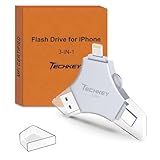
Overview: This MFi Certified 512GB Flash Drive delivers premium storage for iPhone, iPad, Android, and PC users. Constructed from high-quality metal with advanced chip technology, it offers dustproof, drop-proof, and anti-magnetic protection. The 3-in-1 design includes USB, Lightning, and Type-C connectors for universal compatibility across iOS 12.1+, Android OTG, Windows 7+, and Mac 10.6+.
What Makes It Stand Out: Beyond its generous capacity, the drive offers one-click backup and direct social media sharing from the ROSPE app. Photos and videos captured through the in-app camera save automatically to the drive and sort into organized folders. The unique keychain design ensures your data stays accessible, while Touch ID/passcode encryption provides comprehensive security for sensitive files.
Value for Money: At $63.99 for 512GB, this drive costs roughly $0.12 per GB—exceptional value for a certified multi-platform drive. It undercuts many lower-capacity alternatives while eliminating monthly cloud fees, paying for itself within months for heavy users who regularly exceed free storage tiers.
Strengths and Weaknesses: Pros include massive 512GB capacity, fast USB 3.0 speeds, robust encryption options, automatic file organization, and keychain portability. Cons are the required app for advanced features, potential metal heating during extended use, and lack of Micro USB support found in some competitors.
Bottom Line: An outstanding choice for power users seeking high-capacity mobile storage with professional-grade security and sharing features. The combination of speed, capacity, and encryption makes it ideal for content creators and mobile professionals.
9. ThePhotoStick® Omni Case | Protective USB Flash Drive Case | Water Resistant Electronics Storage | USB Organizer | Portable Electronics Accessories Case | Shockproof Hard Carrying Travel Case

Overview: ThePhotoStick Omni Case is a protective nylon carrying case designed for USB flash drives and electronic accessories. This water-resistant organizer features a soft-lined interior to prevent scratches and a compact form factor that attaches easily to keys or fits in any bag. It transforms loose, vulnerable drives into a secure, portable system.
What Makes It Stand Out: Specifically engineered for the PhotoStick Omni but universally compatible, this case offers professional-grade protection at a budget price. The interior features mesh pockets and secure-fit elastic straps that organize not just flash drives but also earphones, SD cards, cables, chargers, and even small hard disks. The water-resistant nylon construction shields against accidental spills and light rain during travel.
Value for Money: At $14.99, this case represents cheap insurance for irreplaceable data. Replacing a lost or damaged drive costs far more than this protective solution. It’s a one-time investment that extends the lifespan of your valuable electronics and prevents the catastrophic loss of precious memories.
Strengths and Weaknesses: Pros include water-resistant protection, versatile organization, compact portability, soft scratch-free interior, and affordable pricing. Cons are limited capacity for multiple large drives, nylon material that may show wear over extended use, and water resistance rather than full waterproofing for submersion scenarios.
Bottom Line: An essential accessory for anyone using portable storage devices. The minimal cost provides significant peace of mind, making it a no-brainer purchase to protect your digital memories and expensive electronics from daily hazards.
10. iDiskk 4TB App-le Certified External Hard Drive for iPhone iPad (iPhone /17/16/15/14/13/12/11/X) Android Mobile,MacBook and Windows PC, Photo Storage Photo Stick Drive to Backup Photos/Videos,Files

Overview: The iDiskk 4TB External Hard Drive represents the pinnacle of mobile storage expansion for iPhone and iPad users. This MFi-certified HDD features an enormous 4TB capacity and a built-in 5000mAh battery that can even charge your devices in emergencies. It enables seamless content transfer between iPhone, iPad, Android, Mac, and PC with plug-and-play simplicity.
What Makes It Stand Out: The massive 5000mAh battery is a game-changer, powering the drive independently while serving as an emergency power bank. One-tap backup automatically saves newly added files while avoiding duplicates. The comprehensive package includes MFi and Type-C cables, plus an 18-month warranty—uncommon in this category and demonstrating manufacturer confidence.
Value for Money: At $219.99 for 4TB, the cost is approximately $55 per terabyte. While premium-priced, it eliminates the need for multiple smaller drives and costly cloud subscriptions. For professionals managing massive media libraries, the convenience, capacity, and included warranty justify the investment within the first year of use.
Strengths and Weaknesses: Pros include record-breaking 4TB capacity, large battery with charging capability, intelligent backup system, complete cable bundle, and extensive warranty. Cons are the high price point, HDD vulnerability to drops and shocks, larger physical size than flash drives, and added weight from the substantial battery.
Bottom Line: The ultimate solution for power users, professional photographers, and videographers requiring maximum mobile storage. The battery backup feature and enormous capacity make it worth the premium for those who can utilize its full potential.
Why Rugged Storage Isn’t Optional for Travel Photographers
Your camera bag’s contents face threats that office-bound gear never encounters. Temperature swings from freezing nights to scorching days, jostling in overloaded Land Rovers, fine dust that infiltrates every seam, and unexpected immersion in water—these aren’t edge cases, they’re daily realities. Standard portable drives, designed for commute-friendly laptop bags, use delicate moving parts and unsealed enclosures that can fail after a single gritty afternoon in the field.
The cost isn’t just the hardware replacement. It’s the lost commission from a National Geographic editor, the destroyed trust of a wedding client waiting for images from a destination ceremony, or the personal devastation of a two-month expedition’s work evaporating. Professional travel photographers treat rugged storage as non-negotiable insurance—calculating the cost per gigabyte against the value of their creative output and reputation.
Understanding the Real Risks in the Field
Consider the physics of your typical shoot day. At 10,000 feet in the Himalayas, air pressure drops significantly, potentially affecting drive mechanics. In the Atacama Desert, diurnal temperature variations exceed 40°C, causing expansion and contraction that stresses solder joints. Salt spray from ocean shoots corrodes unprotected connectors within hours. Even the simple act of transferring files in a moving vehicle subjects drives to constant vibration that can cause read/write heads to skip or crash on traditional HDDs.
These environmental stressors compound over time. A drive that survives one incident might have sustained microscopic damage that leads to failure weeks later. This is why durability ratings matter less as bragging rights and more as empirical data about sustained performance under cumulative stress.
Decoding Durability: What “Rugged” Actually Means
Manufacturers splash terms like “shockproof” and “water-resistant” across packaging, but these words lack standard definition without certification. True ruggedization involves systematic engineering: reinforced internal frames that isolate storage components from chassis impacts, gaskets and O-rings creating IP-rated seals, conformal coatings on circuit boards repelling moisture, and firmware algorithms that park heads or flush cache before impact sensors detect drops.
The difference between a ruggedized drive and a standard drive in a rubber sleeve is profound. The latter might survive a 3-foot drop onto carpet but will likely fail when a yak steps on your bag or your duffel gets tossed from a boat onto a rocky shore. Professional-grade rugged drives undergo accelerated life testing that simulates years of field abuse in compressed timeframes.
IP Ratings Explained: From Dust to Downpours
Ingress Protection ratings consist of two digits: the first measures solid particle protection (0-6), the second liquid ingress protection (0-9). For field photography, IP65 represents the practical minimum—dust-tight and protected against water jets from any direction. This means you can rinse off mud under a faucet without panic.
IP67 (immersion up to 1 meter for 30 minutes) offers true peace of mind for river crossings or unexpected downpours. IP68 exceeds this with manufacturer-specified depths, while IP69K withstands high-pressure steam cleaning—overkill for most but critical for expedition photographers whose gear gets caked in glacier silt or volcanic ash. Never trust a drive that claims “water-resistant” without a specific IP rating; this is marketing speak for “we hope it survives a splash.”
Military Standards: MIL-STD-810G and Beyond
MIL-STD-810G represents a series of tests including drop, shock, vibration, temperature extremes, and humidity. However—and this is crucial—manufacturers can cherry-pick which tests they perform and still claim 810G compliance. A drive “tested to MIL-STD-810G standards” might have only passed the drop test while failing humidity miserably.
Look for specific test method numbers. Method 516.6 covers shock, 514.6 covers vibration, 507.5 covers humidity. The gold standard is a drive certified across multiple relevant methods with published results. Some manufacturers now reference MIL-STD-810H, the updated revision with more stringent criteria. For photography in extreme environments, method 510.5 (sand and dust) and 521.3 (icing/freezing rain) certifications provide confidence that the drive understands your world.
Capacity Planning: How Much Space Do You Really Need?
The “bigger is better” mentality leads many photographers to overspend on capacity they’ll never use, while underestimating their actual data generation rate. A 45-megapixel camera shooting uncompressed RAW files produces roughly 50MB per image. Add bracketed shots, focus stacking sequences, and the occasional video clip, and you’re generating 2-4GB per location.
Calculate your daily shoot rate, then multiply by your longest expedition without offload capability. A two-week trek through Papua New Guinea with no reliable power means you need enough capacity for 14 days plus a 50% safety margin for the unexpected. But also consider your backup strategy—if you’re implementing a 3-2-1 approach in the field, you need multiple drives, making several smaller drives potentially smarter than one massive unit.
The RAW File Reality Check
Compressed RAW (cRAW) files from newer Sony and Canon bodies reduce size by 30-40% with minimal quality loss, but this changes capacity calculations dramatically. Meanwhile, medium format shooters using Phase One or Fujifilm GFX systems face 100-200MB per file, exploding storage needs. Video compounds this exponentially: 4K at 60fps can generate 400MB per minute, while 8K RAW from a Canon R5 reaches 2,600Mbps—filling a 1TB drive in under an hour.
Your drive capacity must align with your capture format. A wedding photographer shooting 2,000 images in a day needs different storage than a wildlife photographer capturing 4K slow-motion sequences. Account for your worst-case scenario, not your average day.
Multi-Day Expedition Calculations
For extended trips, factor in power constraints. Solid-state drives (SSDs) use less power than hard disk drives (HDDs), critical when charging from solar panels. A 2TB SSD might cost more than a 4TB HDD, but if it means you can leave a power-hungry laptop in your bag and backup directly from card readers, the net weight and power savings justify the expense.
Consider the “data diet” approach: some professionals carry a small, fast SSD for daily backups and a larger HDD for weekly archives, balancing speed, capacity, and power consumption. This hybrid strategy also provides redundancy—if the SSD fails, you lose a day; if the HDD fails, you lose a week, but the SSD contains your most recent critical work.
Speed Matters: Transfer Rates in Real-World Conditions
A drive’s advertised speed—540MB/s, 1050MB/s, 2800MB/s—represents idealized lab conditions with sequential large files. In the field, you’re transferring thousands of small RAW files, which drastically reduces real-world speeds due to file system overhead and random access patterns. A drive that benchmarks at 1000MB/s might deliver only 200-300MB/s when copying a card full of 50MB RAW files.
This performance gap matters when you’re exhausted after a 4 AM sunrise shoot and need to backup three 128GB cards before the evening golden hour. An hour-long transfer translates to missed opportunities or compromised sleep. Speed also affects power consumption—slower transfers keep drives active longer, draining limited battery resources.
USB Standards Decoded: From 3.2 to Thunderbolt 4
USB naming conventions have become a confusing mess. USB 3.2 Gen 1 (formerly USB 3.0) caps at 5Gbps theoretical, delivering ~400MB/s real-world. USB 3.2 Gen 2 doubles this to 10Gbps (~800MB/s). Gen 2x2 reaches 20Gbps but requires rare USB-C ports with dual-lane capability.
Thunderbolt 3 and 4 offer 40Gbps but only benefit SSDs that exceed 2000MB/s sustained writes—overkill for most field backups unless you’re offloading 8K video nightly. The critical factor isn’t maximum speed but consistent performance under thermal stress. Many drives throttle speeds when internal temperatures rise, exactly when you’re transferring data in a hot tent or sun-baked vehicle. Look for drives with thermal management features like aluminum heatsinks or graphene cooling pads.
SSD vs HDD: The Performance vs Price Equation
Hard disk drives offer terabytes at pennies per gigabyte but contain spinning platters and delicate heads that fail catastrophically under impact. A 2TB HDD might cost $70 versus $200 for an equivalent SSD, but that $130 savings evaporates if you lose a $5,000 assignment due to drive failure. SSDs have no moving parts, withstand drops from 3 meters onto concrete, and operate silently—crucial when backing up in a shared expedition tent or near skittish wildlife.
The middle ground? Portable SSDs using QLC NAND flash offer larger capacities at lower prices but have slower write speeds and shorter lifespans than premium TLC NAND. For field use, TLC is worth the premium. Some professionals carry a small, fast TLC SSD for active work and a larger, cheaper QLC drive for deep storage, optimizing both budget and reliability.
Power Management in Remote Locations
When you’re charging gear from a 20W solar panel or a Goal Zero battery pack, every watt matters. HDDs typically draw 4-8W during operation and 2-3W idle, while SSDs use 2-4W active and under 0.5W idle. Over a two-week trip, this difference can mean the ability to backup one more card or keep your headlamp charged for a pre-dawn shoot.
Some drives support USB Power Delivery (PD) negotiation, drawing only what they need from compatible sources. Others pull maximum current regardless, potentially tripping overload protection on budget power banks. Check a drive’s power draw specifications—manufacturers rarely advertise this, but it’s critical for off-grid work.
Bus-Powered Drives and Battery Drain
Bus-powered drives draw electricity directly from your laptop or tablet, eliminating separate power adapters. However, they can drain a laptop’s battery 30-50% faster, reducing your editing time. Some drives feature low-power modes that spin down (HDD) or enter sleep states (SSD) after inactivity, but waking them can cause transfer interruptions.
For truly remote work, consider drives with dedicated power inputs that can run from external battery packs. This isolates them from your computer’s power budget, ensuring you can backup cards even if your laptop is dead. The trade-off is another cable and power adapter to manage, but the reliability is worth it when documenting polar expeditions or desert crossings.
File System Fundamentals: Cross-Platform Compatibility
You shot on a Canon camera (FAT32), backed up to a drive from your Mac (APFS), and now a client needs files on their Windows machine (NTFS). File system incompatibilities create nightmare scenarios in the field. exFAT emerges as the universal standard, readable and writable by macOS, Windows, and most cameras with USB host capability—but it lacks journaling, meaning corruption is more likely if a transfer is interrupted.
APFS offers superior performance on Macs with encryption and snapshot capabilities, but Windows requires third-party drivers that may be unstable. NTFS is Windows-native but read-only on Macs without additional software. Some rugged drives come pre-formatted with proprietary software that creates cross-platform partitions, but this adds complexity.
The professional solution? Format all field drives as exFAT for maximum compatibility, but verify each drive’s integrity weekly with checksums. For critical assignments, carry a small Mac- or Windows-formatted drive as a secondary backup to leverage native journaling and recovery features.
Security Features: Protecting Your Intellectual Property
A stolen drive containing unreleased images represents both financial loss and competitive disadvantage. Hardware encryption embedded in the drive’s controller encrypts all data at rest without performance penalty. Look for AES 256-bit encryption with FIPS 140-2 certification—this means the cryptography has been validated by government standards.
Some drives feature PIN-code entry via built-in keypads, ensuring data remains secure even if the drive is stolen from your hotel room. Others use biometric authentication, though fingerprint readers can be unreliable with dirty or gloved hands in the field. The key is encryption that doesn’t require software installation, as you might need to access files from a client’s locked-down corporate laptop.
Hardware Encryption vs Software Solutions
Software encryption like VeraCrypt or Bitlocker provides strong security but requires installation and can reduce transfer speeds by 10-30%. More critically, if your computer crashes during a field backup, you might be left with partially encrypted, corrupted files. Hardware encryption operates at the drive level—invisible to the host system and immune to OS failures.
However, hardware encryption introduces a single point of failure: lose the PIN or experience a controller failure, and your data is cryptographically unrecoverable. Some professionals use a hybrid approach: hardware-encrypted drives for transport between locations, with a separate unencrypted backup stored in a different bag for emergency access. This balances security against absolute data loss risk.
Physical Portability: Beyond Just Size and Weight
A drive that fits in your palm but requires a separate cable, power adapter, and dongle collection becomes a tangled mess in a cramped tent. Integrated cable designs eliminate forgotten cords, but if the cable fails, the entire drive is useless. Some rugged drives feature captive cables that tuck into the chassis, offering the best of both worlds.
Weight distribution matters more than absolute weight. A 1TB SSD weighing 200 grams feels lighter than a 150-gram drive with a bulky, stiff cable that pulls on ports. Consider how the drive mounts: can it clip to a backpack strap? Does it have a lanyard loop for securing inside a dry bag? These details separate gear that works in the real world from spec-sheet champions.
Cable Management and Port Protection
The drive’s connector is its Achilles’ heel. USB-C ports are reversible and versatile but collect dust and lint that cause intermittent connections. Some rugged drives include port covers that seal with O-rings, but these can be lost in the field. Magnetic cable adapters offer a compromise—leaving a small plug in the drive port that repels dust and breaks away under stress, preventing port damage.
Cable quality varies enormously. A $5 USB-C cable might claim 10Gbps but deliver 480Mbps in practice, turning fast backups into overnight ordeals. Look for cables with EMI shielding and reinforced strain relief. Some drives include braided steel cables that double as security tethers. Redundancy is key: carry at least two cables of different lengths, and consider a USB-C to USB-A adapter for connecting to older computers or card readers.
Field Workflow Strategies: The 3-2-1 Backup Rule
The classic 3-2-1 rule—three copies, two different media, one offsite—gets modified in the field to 3-2-1-0: three copies, two media, one stored separately, zero reliance on internet. This means your camera cards become your primary storage, with two separate drives as backups. Never wipe cards until both backups are verified.
Smart photographers adopt a rolling backup strategy. At each location, backup to Drive A. At the next location, backup to Drive B. This ensures a geographic separation—if Drive A gets stolen from your hotel, Drive B contains everything up to the previous day, still in your camera bag. For multi-week trips, mail a third drive home at the midpoint, creating an offsite backup that survives even if all your luggage vanishes.
Incremental vs Full Backups on the Road
Full backups nightly are simplest but time-consuming. Incremental backups—copying only changed files—save time but create complex file dependencies that complicate recovery if the backup catalog corrupts. In the field, simplicity wins. Use date-based folder structures (YYYY-MM-DD_Location) and copy entire days at once.
Some drives include one-touch backup buttons that clone attached storage without a computer. This works for quick card dumps but offers no verification. Professional workflow demands at least checksum verification (comparing file hashes) or, better, byte-for-byte comparison. Software like Carbon Copy Cloner or GoodSync can automate this, generating logs you can review over morning coffee.
Common Pitfalls: What Marketing Won’t Tell You
“Crushproof” often means surviving a specific weight on a specific point, not being run over by a Land Cruiser. “Shockproof” ratings assume the drive is powered off; operating shocks are typically rated much lower. A drive dropped while spinning (HDD) or writing (SSD) faces far higher failure risk than one dropped while idle.
Temperature ratings are equally misleading. A drive rated for 0°C to 40°C operation might survive -10°C storage but will experience dramatically higher error rates and potential data corruption at the extremes. SSDs are particularly sensitive to high temperatures—sustained writes above 70°C can cause thermal throttling or premature cell wear. Some drives include temperature sensors accessible via software; monitoring these during long transfers reveals whether your drive is cooking inside a black camera bag in the sun.
Price vs. Value: Making the Smart Investment
A $300 rugged SSD seems expensive compared to a $80 plastic enclosure model, but calculate cost per protected gigabyte. If the cheap drive fails once during a three-year lifespan, losing even one day’s work from a paid assignment, the true cost becomes apparent. Professional photographers amortize drive costs across projects—a $300 drive protecting 50 shoots annually costs $6 per assignment.
Warranty terms reveal manufacturer confidence. A three-year warranty is standard; five years indicates premium components. Some warranties include data recovery services, which can cost $1,000+ if attempted independently. Read the fine print: many warranties exclude water damage even on “waterproof” drives if the port cover was open. This is why IP69K ratings (no port covers needed) matter for serious expedition work.
Maintenance and Longevity: Extending Your Drive’s Life
Rugged doesn’t mean indestructible. After each trip, inspect port seals for cracks, test drop resistance by dropping onto a soft surface (to verify internal shock mounts haven’t degraded), and run a full SMART health check. SSDs have finite write cycles; most consumer drives are rated for 600 TBW (terabytes written) before cell wear becomes critical. A photographer writing 100GB daily will exceed this in 16 years—well beyond typical replacement cycles.
Humidity is the silent killer. Storing drives in sealed bags with desiccant prevents internal condensation that corrodes connectors. For long-term storage between trips, keep drives at 40-50% charge (for SSDs with power loss protection capacitors) and power them on quarterly to refresh stored data. NAND flash cells leak charge over time; reading and rewriting data annually prevents bit rot.
Future-Proofing Your Storage Investment
USB4 and Thunderbolt 5 are emerging, but backward compatibility ensures today’s drives remain useful. However, connector durability matters more than protocol speed. USB-C ports are rated for 10,000 insertions, but field conditions accelerate wear. Consider drives with replaceable port modules or those using magnetic connectors that minimize physical wear.
Storage capacities double approximately every 18 months, but your image sizes grow too. Cameras pushing 100+ megapixels and 8K video mean today’s “overkill” 4TB drive becomes tomorrow’s minimum. Buy 50% more capacity than you currently need, but don’t pay premium prices for bleeding-edge sizes where cost per terabyte is highest. The sweet spot is usually one step below the maximum available capacity.
Frequently Asked Questions
How much storage capacity do I need for a two-week photography trip?
Calculate your daily average (e.g., 50GB) and multiply by trip length (14 days = 700GB). Add a 50% safety margin for video bursts or extended shoots (1,050GB). Then double this for your 3-2-1 backup strategy, requiring at least 2TB of total drive capacity across multiple devices.
What’s the difference between IP67 and IP68 ratings for field use?
IP67 guarantees protection against immersion up to 1 meter for 30 minutes. IP68 is manufacturer-defined, often deeper or longer immersion. For river crossings or boat work, IP68 provides confidence. IP67 suffices for rain and accidental submersion in shallow water. Both are dust-tight (the ‘6’ rating).
Should I choose SSD or HDD for high-altitude photography?
SSDs are superior above 10,000 feet. HDDs rely on air pressure to float read/write heads above platters; thin air causes head crashes or higher error rates. SSDs have no moving parts and function normally at any altitude. The price premium is justified for mountain and aerial photography.
How do I verify my backups in the field without a computer?
Some drives have built-in status LEDs that verify successful copies. For deeper verification, portable card readers with screens can compare file counts and capacities. The most reliable method is a rugged tablet with backup verification software. Never rely on “copy complete” messages alone—always spot-check several files can open correctly.
Can I daisy-chain multiple drives for simultaneous backups?
USB hubs work but introduce power and bandwidth sharing. A powered hub helps, but bus-powered drives may still disconnect under load. For reliability, backup to one drive at a time. Thunderbolt supports daisy-chaining with dedicated power, but this increases cable complexity. Simplicity reduces failure points in harsh conditions.
What’s the maximum safe operating temperature for rugged drives?
Most SSDs function reliably up to 70°C before thermal throttling. HDDs typically max at 55°C. In practice, avoid leaving drives in direct sunlight or hot vehicles. Black enclosures absorb heat; lighter colors or reflective materials stay cooler. If a drive feels hot to touch, let it cool before use. Extreme cold (-10°C) causes battery drain and sluggish performance but rarely damages drives permanently.
How long do rugged portable drives actually last in the field?
With proper care, expect 3-5 years of heavy field use. The NAND flash in SSDs degrades with write cycles, but most photographers won’t hit these limits. HDDs may last longer in gentle use but are more vulnerable to cumulative shock damage. Replace drives after any major impact event, visible damage to the enclosure, or when SMART health checks show reallocated sectors.
Are magnetic cable adapters safe for data integrity?
Quality magnetic adapters maintain data integrity but may reduce speeds slightly due to connection resistance. Avoid cheap adapters that lack proper shielding. Premium adapters with gold-plated contacts and 24-pin designs support full USB 3.2 speeds. They’re excellent for preventing port damage but add another potential failure point—carry a standard cable as backup.
What’s the best file system for cross-platform field work?
exFAT offers the best compatibility across macOS, Windows, and Linux without file size limits. However, it lacks journaling, making it vulnerable to corruption during improper ejections. For maximum safety, format one backup drive as exFAT and a second as your native OS format (APFS for Mac, NTFS for Windows) with journaling enabled. This provides both universal access and corruption protection.
How do I protect drives from airport X-ray scanners and security?
Modern X-ray machines don’t damage drives, but always carry them in your hand luggage. Checked baggage experiences rougher handling and extreme temperatures. For border crossings with sensitive work, use hardware encryption. Some countries can legally demand decryption keys; having a “travel” drive with processed JPEGs for inspection while keeping RAW files on encrypted media balances compliance with privacy. Never check encrypted drives—lost keys mean permanent data loss.’