Picture this: you’re perched at a cliffside café in Santorini, video-calling your family while uploading high-res photos, or navigating Tokyo’s neon-lit streets with real-time translation—all without draining your phone’s battery or hemorrhaging money on roaming fees. This isn’t a luxury reserved for tech elites; it’s the new normal for travelers who’ve discovered the freedom of dedicated mobile hotspots. As our work and lives become increasingly untethered, the difference between a frustrating trip and a seamless journey often boils down to one device that fits in your pocket.
But here’s the catch: not all travel hotspots are created equal. The market is flooded with options promising “global connectivity,” yet many travelers still find themselves stranded with spotty signals, hidden charges, or devices that work perfectly in London but become expensive paperweights in Laos. Understanding what separates a transformative travel companion from a costly mistake requires diving deep into the technical specifications, business models, and real-world performance factors that rarely make it into marketing materials. Let’s unpack everything you need to know to make an informed decision that will revolutionize how you stay connected across borders.
Top 10 Travel-Friendly Wi-Fi Hotspots
Detailed Product Reviews
1. TP-Link Ultra-Portable Wi-Fi 6 AX1500 Travel Router TL-WR1502X | Easy Public WiFi Sharing | Hotel/RV/Travel Approved | Phone WiFi Tether | USB C Powered | Multi-Mode | Tether App | Durable Design

Overview: The TP-Link TL-WR1502X is a pocket-sized WiFi 6 travel router designed for modern travelers seeking reliable connectivity on the go. This versatile device transforms wired connections into secure wireless networks and extends existing WiFi signals, making it ideal for hotel rooms, RVs, and remote work scenarios. Its durable, fanless design ensures silent operation and longevity.
What Makes It Stand Out: This router’s WiFi 6 capability delivers impressive speeds up to 1201 Mbps on the 5 GHz band—rare at this price point. The six operating modes (Router, Access Point, Range Extender, Hotspot, Client, and 3G/4G Modem) provide exceptional flexibility. USB tethering support lets you share your phone’s data connection, while the USB-C power input allows operation from power banks, enhancing portability.
Value for Money: At $38.98, the TL-WR1502X offers remarkable value. You’re getting WiFi 6 technology and multi-mode functionality typically found in pricier models. It’s significantly cheaper than cellular hotspots while offering superior speeds when connected to hotel or public Ethernet. The cost savings versus renting hotel WiFi or using cellular data quickly justify the investment.
Strengths and Weaknesses: Strengths: Compact design; WiFi 6 speeds; Multiple versatile modes; USB-C power flexibility; Affordable price; USB tethering support. Weaknesses: No built-in battery; Requires external USB modem for cellular connectivity; No 6 GHz band; Limited to 300 Mbps on 2.4 GHz.
Bottom Line: The TL-WR1502X is an excellent choice for travelers who primarily need to share or extend existing internet connections. While it won’t replace a cellular hotspot for true off-grid use, its WiFi 6 performance, versatile modes, and unbeatable price make it a must-have for hotel hoppers and remote workers. Highly recommended for its intended purpose.
2. FIRSTNUM M5 Mobile Hotspot, Portable WiFi Hotspot for Travel in 160+ Countries, Connect Up to10 Devices, No SIM Card Required and No Contract eSIM Hotspot, Portable Hotspot with 1GB Free Data Monthly

Overview: The FIRSTNUM M5 is a true mobile hotspot designed for international travelers seeking hassle-free connectivity. This eSIM-powered device eliminates the need for physical SIM cards and works in over 160 countries. With its built-in 3000mAh battery and compact form factor, it provides independent internet access anywhere with cellular coverage.
What Makes It Stand Out: The lifetime 1GB monthly free data plan is a unique offering that provides basic connectivity without ongoing costs. The eSIM technology automatically connects to the strongest local 4G network, intelligently switching carriers for optimal performance. Prepaid flexibility with no contracts allows you to purchase data only when needed, making it ideal for occasional travelers.
Value for Money: At $84.99, the M5 sits in the mid-range for mobile hotspots. The included lifetime data, while modest, adds significant long-term value. Compared to international roaming charges or purchasing local SIMs in multiple countries, the convenience and potential savings are substantial. Flexible data plans let you scale costs based on actual usage.
Strengths and Weaknesses: Strengths: eSIM convenience; 160+ country coverage; Lifetime 1GB monthly data; No contracts; Built-in battery; Connects 10 devices; Secure private network. Weaknesses: Only 6-hour battery life; 1GB free data is minimal for heavy use; Dependent on local signal quality; Higher upfront cost than basic routers.
Bottom Line: The FIRSTNUM M5 excels for international travelers wanting simple, secure connectivity without SIM swapping. While power users will need larger data plans, the free monthly allowance covers essential tasks. The convenience factor and global coverage justify the price for frequent travelers. Recommended for those prioritizing ease of use over maximum performance.
3. TP-Link BE3600 Wi-Fi 7 Portable Travel Router TL-WR3602BE | Dual-Band, 2.5 Gig Port, USB 3.0 | Multi-Modes in One | OpenVPN, WireGuard® | Public WiFi Sharing for Hotel/Cruise/RV/Plane | No 6 GHz

Overview: The TP-Link TL-WR3602BE is a cutting-edge WiFi 7 travel router built for tech enthusiasts and heavy users. Delivering speeds up to 2882 Mbps on 5 GHz and supporting up to 90 devices, this premium device transforms any internet connection into a high-performance network. Its advanced features make it ideal for demanding travelers and remote professionals.
What Makes It Stand Out: WiFi 7 technology provides future-proof connectivity with significantly improved capacity and reduced latency. The 2.5 Gbps WAN port enables ultra-fast wired connections, while built-in VPN server/client support (OpenVPN/WireGuard) offers enterprise-grade security. TP-Link’s cybersecurity pledge ensures regular security updates, a critical feature for public network usage.
Value for Money: At $99, this router commands a premium but delivers professional-grade features. The WiFi 7 future-proofing, multi-gigabit ports, and robust VPN capabilities justify the cost for power users. Compared to basic travel routers, you’re investing in longevity and security. For those needing maximum performance and device support, it offers excellent ROI.
Strengths and Weaknesses: Strengths: WiFi 7 speeds; 2.5 Gbps port; VPN server/client; 90-device capacity; USB 3.0; Strong security focus; Multi-mode flexibility. Weaknesses: No built-in battery; No 6 GHz band; No cellular modem; Higher price; No OpenWrt support.
Bottom Line: The TL-WR3602BE is the ultimate travel router for performance-focused users who prioritize speed, security, and future-proofing. While it lacks cellular connectivity and battery power, its WiFi 7 capabilities and VPN features make it unparalleled for securing public connections. Highly recommended for digital nomads and professionals handling sensitive data.
4. New TravlFi JourneyGo LTE RV WiFi Hotspot | RV Internet with Multiple Networks, Pay As You Go and No Contracts | Portable Internet for Travel, Motorhomes and Campers

Overview: The TravlFi JourneyGo is an LTE hotspot specifically designed for RV travelers seeking reliable internet across the United States. This eSIM-enabled device creates a private, secure network without requiring physical SIM cards. Its pay-as-you-go model and broad coverage make it ideal for mobile lifestyles, from weekend campers to full-time RVers.
What Makes It Stand Out: Unlike travel routers that need existing WiFi, the JourneyGo provides independent internet via cellular networks. The eSIM technology automatically accesses multiple major carriers, ensuring optimal coverage. Flexible data plans from 2GB to unlimited accommodate varying usage patterns, while the no-contract approach aligns perfectly with seasonal travel schedules.
Value for Money: At $159, this is a premium single-purpose device. However, for RVers, the value lies in reliable, wide coverage and flexible plans. The ability to pause service eliminates wasted subscription costs. Compared to satellite internet or multiple carrier plans, it offers cost-effective connectivity. The convenience of built-in cellular justifies the price for its target audience.
Strengths and Weaknesses: Strengths: Independent cellular connectivity; eSIM convenience; Flexible pay-as-you-go plans; Excellent US coverage; Private secure network; No contracts. Weaknesses: US-only coverage; No WiFi extending capability; Higher upfront cost; Requires cellular signal; Limited to RV/travel use case.
Bottom Line: The JourneyGo is purpose-built for RV travelers prioritizing reliable internet over versatility. While it won’t replace a multi-mode router for hotel stays, its cellular-first design and flexible plans solve the unique connectivity challenges of mobile living. Recommended for RVers and campers who need internet independence wherever they park.
5. TP-Link AC750 Wireless Portable Nano Travel Router(TL-WR902AC) - Support Multiple Modes, WiFi Router/Hotspot/Bridge/Range Extender/Access Point/Client Modes, Dual Band WiFi, 1 USB 2.0 Port

Overview: The TP-Link TL-WR902AC is an ultra-compact AC750 travel router that packs surprising versatility into a tiny footprint. This budget-friendly device creates WiFi networks from Ethernet connections and extends existing wireless signals, making it perfect for occasional travelers and hotel guests. Its simplicity and reliability have made it a popular choice for basic connectivity needs.
What Makes It Stand Out: The nano-sized design is among the smallest available, easily fitting in any pocket or bag. Multiple operating modes provide flexibility for various scenarios, from creating a hotel room network to extending home WiFi. The inclusion of a 2-year warranty and 24/7 technical support is exceptional for this price category, providing peace of mind for non-technical users.
Value for Money: At $39.99, this is one of the most affordable travel routers available. While limited to WiFi 5 speeds, it covers essential functions admirably. The warranty and support add significant value, making it a low-risk investment. For travelers needing basic connectivity without cutting-edge features, it delivers exceptional bang for your buck.
Strengths and Weaknesses: Strengths: Extremely compact; Affordable price; Multiple modes; 2-year warranty; 24/7 support; Flexible USB power. Weaknesses: WiFi 5 only (no WiFi 6/7); USB 2.0 port; No built-in battery; Lower speeds; No cellular modem; No VPN features.
Bottom Line: The TL-WR902AC is the perfect entry-level travel router for budget-conscious travelers with modest needs. While it lacks advanced features and cutting-edge speeds, its reliability, tiny size, and excellent support make it ideal for basic hotel WiFi sharing and network extension. Recommended for occasional travelers who prioritize portability and affordability over performance.
6. SIGNALHIVE 4G LTE Mobile Hotspot(1GB of Monthly Data),Security,No SIM Card, 8hrs Battery Life,Up to 10 Devices,Portable WiFi Hotspot for Travel

Overview: The SIGNALHIVE 4G LTE Mobile Hotspot delivers streamlined connectivity for North American travelers without the SIM card hassle. This pocket-sized device provides 1GB of monthly US data for life, covering both the United States and Mexico by intelligently switching between major carriers like T-Mobile, Verizon, AT&T, Telmex, and America Movil. With an 8-hour battery life and support for up to 10 simultaneous connections, it’s engineered for vacationers and business travelers seeking straightforward internet access.
What Makes It Stand Out: The no-SIM operation is the headline feature—eliminating physical cards and contracts entirely. Its smart network selection automatically connects to the fastest available 4G tower, ensuring stable performance across borders. The built-in screen displays real-time system status, while pay-as-you-go data packages offer flexibility without long-term commitments. The 3000mAh battery supports Type-C fast recharging, minimizing downtime.
Value for Money: At $99.99, the included lifetime 1GB monthly plan makes this compelling for light users. While 1GB won’t suffice for heavy streaming, it’s adequate for email, maps, and messaging. Compared to purchasing separate international plans or roaming packages, the convenience factor justifies the price for frequent border-crossers.
Strengths and Weaknesses: Strengths include true plug-and-play simplicity, multi-carrier redundancy, robust security features, and no contract obligations. The 8-hour battery is respectable but not class-leading. Weaknesses are the modest data allowance, coverage limited to US/Mexico, and performance dependency on local signal strength. Heavy data users will need supplemental packages.
Bottom Line: Ideal for occasional travelers prioritizing convenience over high data consumption. The SIGNALHIVE excels as a hassle-free, secure hotspot for basic connectivity across North America, though power users should look elsewhere.
7. SCHOK 4G LTE Portable WiFi - Cat 12 Mobile Hotspot Travel Router, 600Mbps Download High Speed, Dual Bands (2.4GHz/5GHz), Supports 16 Connected Devices, Compatible with Verizon,T-Mobile, AT&T

Overview: The SCHOK 4G LTE Portable WiFi is a performance-focused mobile hotspot built for speed enthusiasts and multi-device households. Leveraging Category 12 LTE technology with Quad Carrier Aggregation (4CA), it delivers theoretical download speeds up to 600Mbps. The dual-band WiFi (2.4GHz/5GHz) with 2x2 MIMO supports up to 16 devices simultaneously, making it ideal for families, remote teams, or heavy users who demand bandwidth.
What Makes It Stand Out: The Cat 12 modem with 4CA technology positions this as a speed leader in its price class, enabling seamless HD streaming and video conferencing. The removable 4000mAh battery is a rare and practical feature—allowing users to swap batteries for truly uninterrupted connectivity. Dual-band support ensures optimal device distribution, reducing network congestion.
Value for Money: At just $48.49, the hardware itself is aggressively priced, offering flagship specs for budget-conscious buyers. However, this doesn’t include data—you’ll need a separate SIM card and a mobile hotspot data plan (not a standard smartphone plan). Factor in ongoing data costs when evaluating total ownership value.
Strengths and Weaknesses: Strengths include blazing-fast potential speeds, excellent device capacity, long-lasting removable battery, and broad carrier compatibility. Weaknesses are the lack of included data, requirement for technical setup (SIM installation and plan activation), and potential confusion between smartphone plans and hotspot plans. Coverage depends entirely on your chosen carrier.
Bottom Line: Perfect for users who prioritize speed and already have or don’t mind securing a dedicated data plan. The SCHOK delivers premium performance at an entry-level price, but it’s not a turnkey solution for casual travelers.
8. SIMO Solis Go 4G Mobile Hotspot WiFi Power Bank with Built-in Cables for Travel in 140+ Countries, No SIM Card or Contract, Multi-Carrier Network, 20 Devices, 1GB/Month Lifetime + 10GB Global Data
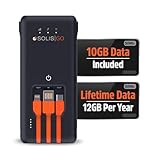
Overview: The SIMO Solis Go redefines global connectivity by combining a no-SIM hotspot with integrated power bank functionality. Covering 140+ countries through a virtual multi-carrier network of over 300 carriers, this device includes 1GB of monthly high-speed data for life plus an additional 10GB of global data. It connects up to 16 devices simultaneously while doubling as a portable charger, making it an all-in-one travel companion.
What Makes It Stand Out: The dual-function design is brilliant—eliminating both connectivity and charging anxiety. Its global virtual SIM technology automatically connects to the best local network without physical SIM swaps. The 24-hour battery life is exceptional, and the built-in cables add convenience. The Solis app provides straightforward device management and data tracking.
Value for Money: At $129.99, the value proposition is strong. The lifetime 1GB monthly data plus 10GB global allocation offsets the initial cost, especially for international travelers who’d otherwise pay exorbitant roaming fees. The power bank capability adds $20-30 of equivalent value, making this a smart bundled purchase.
Strengths and Weaknesses: Strengths include unparalleled global coverage, generous included data, massive battery life, and integrated charging cables. The 16-device capacity is ample for groups. Weaknesses are the premium price point and that heavy data users will burn through the included allowance quickly, requiring additional purchases. It’s slightly bulkier than single-purpose hotspots.
Bottom Line: An excellent investment for frequent international travelers seeking a comprehensive, hassle-free solution. The SIMO Solis Go justifies its price through global coverage, included data, and dual functionality.
9. GL.iNet GL-SFT1200 (Opal) Portable WiFi Travel Router, Mini VPN Wireless Router for Fiber Optic Modem, Mobile Internet WiFi Repeater, Dual Band Openwrt Computer Routers, Home/Business/RV/Cruise

Overview: The GL.iNet GL-SFT1200 (Opal) is a specialized travel router—not a cellular hotspot—designed for security-conscious travelers. This AC1200 dual-band router runs OpenWrt firmware and weighs just 145g, making it ideal for creating secure networks from existing internet sources. It connects to hotel WiFi, ethernet ports, or fiber modems, then broadcasts a protected private network for your devices.
What Makes It Stand Out: Pre-installed OpenVPN and WireGuard, compatible with 30+ VPN providers, sets this apart for privacy protection. Cloudflare encryption adds another security layer. The three Gigabit ports (2 LAN, 1 WAN) enable wired device connections, while dual-band WiFi handles up to 300 Mbps (2.4GHz) and 867 Mbps (5GHz). Its programmable nature appeals to tech-savvy users.
Value for Money: At $34.99, it’s remarkably affordable for a router with enterprise-grade features. However, it’s crucial to understand this requires an existing internet connection—it doesn’t provide cellular data. For travelers already paying for hotel WiFi or ethernet, it adds security and convenience at minimal cost.
Strengths and Weaknesses: Strengths include exceptional security features, OpenWrt flexibility, compact portability, Gigabit ports, and dual-band performance. Weaknesses are the fundamental limitation: no built-in cellular modem means zero connectivity without a separate internet source. Setup requires technical knowledge, and it’s not a true mobile hotspot replacement.
Bottom Line: Perfect for tech-savvy travelers prioritizing security over standalone connectivity. The GL-SFT1200 excels as a portable privacy shield, but cannot function as a primary internet source without external WiFi or ethernet.
10. RoamWiFi 4G LTE Mobile Hotspot Router, Worldwide Portable High Speed Hotspot with US 10GB & Global 1GB Data 30Day, 10 Devices No SIM Card Needed,Pocket Hotspot for Travel in 160+ Countries

Overview: The RoamWiFi 4G LTE Mobile Hotspot Router delivers comprehensive global connectivity with generous data allowances. Covering 170+ countries, it includes 10GB of data for the US, Canada, and Mexico plus 1GB of global data—both valid for 30 days after activation. Supporting up to 10 devices simultaneously, this pocket-sized hotspot uses intelligent network selection to automatically connect to the optimal local carrier without requiring a SIM card.
What Makes It Stand Out: The substantial 10GB regional data allocation is significantly more generous than competitors’ offerings. Intelligent network optimization technology continuously scans for the strongest signal, ensuring stable connections across 170+ countries. The no-contract, no-SIM design offers true plug-and-play convenience, while 24/7 customer support provides peace of mind for travelers.
Value for Money: At $159.99, the upfront cost is offset by the substantial included data package. For short-term international travel or multi-country trips, this eliminates expensive roaming charges and SIM card procurement hassles. The 30-day validity requires planning, but the data quantity is excellent for the price.
Strengths and Weaknesses: Strengths include extensive global coverage, large data allowances, intelligent network switching, compact design, and responsive customer support. The 10-device limit is sufficient for most users. Weaknesses are the premium pricing and the 30-day data expiration—unused data doesn’t roll over. Heavy users may need top-ups, and long-term travelers must purchase additional plans.
Bottom Line: An excellent choice for travelers seeking generous data and extensive coverage without complexity. RoamWiFi justifies its higher price through substantial included data and intelligent global connectivity.
Understanding Travel Wi-Fi Hotspots: Your Gateway to Global Connectivity
What Exactly Is a Travel Hotspot?
A travel-friendly Wi-Fi hotspot is a purpose-built device that creates a private, secure wireless network by connecting to cellular networks in your destination country. Unlike the hotspot feature on your smartphone, these dedicated gadgets are engineered specifically for international roaming, housing multiple antennas, advanced modems, and often dual-SIM or eSIM capabilities that automatically switch between local carriers for optimal performance. Think of them as your personal, pocket-sized internet service provider that negotiates with foreign networks on your behalf, delivering connectivity to your phone, laptop, tablet, and camera simultaneously without exposing your primary device to the security risks of public Wi-Fi.
How Travel Hotspots Differ from Your Phone’s Tethering
While tethering seems convenient, it fundamentally compromises your travel experience in ways most users don’t realize until it’s too late. Your phone’s hotspot function wasn’t designed for sustained, multi-device connectivity—it rapidly depletes battery life, overheats, and often triggers carrier throttling after minimal usage. More critically, tethering broadcasts your phone’s primary SIM information, making you vulnerable to carrier-imposed international roaming limits that can result in bill shock exceeding $10 per day. Dedicated hotspots operate on entirely separate data agreements, bypassing these restrictions while preserving your phone’s battery for navigation, photography, and emergency calls.
Why Traditional Roaming Falls Short in 2024
The Hidden Costs of International Data Roaming
Major carriers have dressed up roaming packages with appealing names like “Travel Pass” or “International Day Pass,” but the economics rarely favor the traveler. These plans typically charge $10-12 daily for access to your domestic data allowance, which sounds reasonable until you calculate a two-week trip costing $140-168 per device. Worse, many carriers bury fair usage policies in fine print that throttle speeds to 2G after just 500MB of daily usage—rendering video calls, cloud backups, and navigation virtually unusable. Travel hotspots, by contrast, operate on wholesale data rates negotiated directly with local carriers, often delivering true 4G/5G speeds at a fraction of the cost.
Speed Throttling and Network Restrictions
Even if budget isn’t your primary concern, network prioritization creates a two-tier system that puts roaming customers last. When networks become congested—as they frequently do in tourist hubs, airports, and business districts—local subscribers receive priority bandwidth while international roamers experience dramatic slowdowns. This isn’t speculation; it’s baked into carrier agreements. Dedicated hotspots with local SIM or eSIM profiles are treated as native devices, accessing the same priority lanes as residents. This technical distinction can mean the difference between a 50Mbps connection that handles Zoom calls flawlessly and a 2Mbps crawl that struggles to load email.
Key Features That Define Exceptional Travel Hotspots
Network Band Compatibility: The Technical Foundation
The single most important specification hiding in plain sight is LTE/5G band support. A hotspot that works brilliantly in the United States might fail entirely in Japan or Brazil because it lacks the specific frequency bands those countries use. The global connectivity promise only materializes when a device supports at least 20 LTE bands and multiple 5G bands across low, mid, and high-frequency spectrums. Look for specifications that explicitly mention Bands 1/3/7/8/20/28 for Europe, Bands 2/4/5/12/17 for the Americas, and Bands 1/3/5/7/8/18/19/26/28/41 for Asia-Pacific. Without this comprehensive band coverage, you’re essentially gambling on connectivity.
eSIM Technology: The Game-Changer for Frequent Travelers
The evolution from physical SIM cards to embedded SIMs (eSIMs) has fundamentally transformed travel connectivity. eSIM-enabled hotspots allow you to purchase and activate data plans digitally before you even land, scanning a QR code to instantly provision service from local carriers. This eliminates the airport scramble to find SIM vendors, language barriers during activation, and the physical juggling of tiny cards. Advanced devices support multiple eSIM profiles simultaneously, automatically switching between carriers as you cross borders or when one network underperforms. For travelers visiting multiple countries, this seamless handoff is the difference between continuous connectivity and hours spent manually reconfiguring settings.
Battery Capacity: Powering Your Digital Nomad Lifestyle
Battery specifications tell a story most marketers gloss over. A 5,000mAh battery theoretically provides 12-15 hours of usage, but real-world performance depends heavily on connected device count, network strength, and temperature extremes common during travel. In weak signal areas, hotspots work harder and drain 40% faster. Cold weather can reduce capacity by 30%. Power users should prioritize devices with 8,000mAh+ batteries and, more importantly, pass-through charging capability—allowing you to use the hotspot while it’s plugged in without damaging the battery. Some advanced models even double as power banks, letting you charge your phone from the hotspot’s reserve, a feature that can be a lifesaver during long travel days.
Security Protocols: Protecting Your Data on Foreign Networks
Every time you connect to a hotel’s “free Wi-Fi,” you’re broadcasting data across a network you don’t control, often unencrypted. Quality travel hotspots create an encrypted tunnel from the device itself, using protocols like WPA3 for Wi-Fi security and VPN integration at the hardware level. Some models include built-in firewalls that block common attack vectors and automatically disable WPS (Wi-Fi Protected Setup)—a known vulnerability. For business travelers handling sensitive documents or accessing corporate networks, look for devices with FIPS 140-2 certification or those that support OpenVPN and WireGuard protocols natively, ensuring your data remains encrypted from the hotspot to the destination server.
Decoding Data Plans: Navigating the Maze of International Options
Pay-As-You-Go vs. Subscription Models
The choice between pay-as-you-go and subscription plans hinges on your travel frequency more than duration. Pay-as-you-go offers flexibility for occasional travelers, letting you purchase specific data packages for each trip without ongoing commitments. However, per-gigabyte costs are typically 30-50% higher, and unused data often expires within 30 days. Subscription models, conversely, provide monthly allowances that rollover and significantly lower per-GB rates—often making sense for anyone taking more than three trips annually. The sweet spot for most travelers is a hybrid approach: a low-cost monthly subscription with the ability to top-up data on demand, preventing overage charges while maintaining flexibility.
Regional vs. Global Plans: Making the Smart Choice
Global plans promise simplicity—one plan, 150+ countries—but this convenience comes at a premium price and often with performance compromises. Regional plans tailored to specific areas (e.g., Europe, Southeast Asia, North America) typically cost 40-60% less and include higher data allowances because the provider has negotiated better wholesale rates with fewer carriers. Savvy travelers mix and match, maintaining a small global plan as backup while using regional plans for their primary destinations. This strategy ensures you’re not paying for expensive global coverage in regions where you never travel, while maintaining the safety net of emergency connectivity anywhere.
Fair Usage Policies: What “Unlimited” Really Means
The word “unlimited” in international data plans is perhaps the most misleading term in travel tech. Virtually every unlimited plan includes a fair usage policy that throttles speeds after a certain threshold—typically 20-50GB monthly. More importantly, many plans differentiate between “unlimited browsing” and “unlimited high-speed data,” where video streaming, cloud backups, and video calls count against a much smaller high-speed allowance. Always scrutinize the terms for phrases like “network management policies” or “speed reductions may apply.” For content creators or remote workers, a transparent 100GB high-speed plan beats a misleading “unlimited” plan that drops to 128kbps after 30GB.
The Great Debate: Rental vs. Purchase
When Renting Makes Perfect Sense
Renting a travel hotspot for $5-10 per day only makes economic sense for trips shorter than five days or for destinations where you need specialized equipment (like satellite connectivity for remote expeditions). Rental companies often include insurance, 24/7 support, and pre-configured local plans, removing all setup friction. This is particularly valuable for one-time trips to regions with complex registration requirements, like China, where local laws mandate specific firmware. However, the per-day cost quickly exceeds purchase price on longer trips, and rented devices may have worn batteries or outdated software that impacts performance.
The Long-Term Value of Ownership
Purchasing a quality travel hotspot ($150-300) becomes cost-effective after just two weeks of cumulative travel. Ownership means you control the device settings, can install firmware updates, and aren’t locked into the rental company’s often-inflated data rates. Your device arrives pre-configured with your preferences, VPN credentials, and familiar interface. For frequent travelers, the math is compelling: a $200 device plus $30 monthly data costs less than renting at $8/day after just 25 days of travel. Plus, you can lend it to friends, resell it, or repurpose it as a backup home internet solution—options unavailable with rentals.
Size Matters: Balancing Portability with Performance
Ultra-Compact Devices for Minimalist Travelers
Credit-card-sized hotspots weighing under 100g appeal to backpackers and carry-on-only travelers, slipping unnoticed into a pocket. These minimalist devices typically sacrifice battery capacity (2,500-3,500mAh) and antenna power, resulting in weaker signal reception and shorter usage times. They’re ideal for urban travel where cellular towers are abundant and you’ll have nightly access to charging. However, the compact design often means fewer simultaneous connections (usually 5-8 devices) and no external antenna ports for signal boosting in rural areas. If your itinerary includes cities like Tokyo, London, or New York, these trade-offs are manageable. For off-grid adventures, they’re a liability.
Full-Feature Hotspots for Power Users
Devices approaching the size of a smartphone (150-200g) pack larger batteries, superior antennas, and advanced features like touchscreen displays for real-time data monitoring. These hotspots support 15-20 simultaneous connections and include Ethernet ports for wired connectivity—crucial for hotel rooms with poor Wi-Fi but available LAN connections. The larger form factor accommodates external antenna connectors, allowing you to attach directional antennas in remote locations, potentially increasing signal strength by 10-15dB. For digital nomads, families traveling with multiple devices, or anyone working from unconventional locations, the slight bulk trade-off delivers reliability that pocket-sized alternatives simply cannot match.
Multi-Device Connectivity: Serving Your Entire Tech Ecosystem
Understanding Connection Limits
Most hotspots advertise support for “up to 10 devices” or “up to 20 devices,” but this number represents simultaneous Wi-Fi connections, not practical usage. Each connected device consumes bandwidth even when idle—phones syncing email, tablets updating apps, laptops backing up photos. A 20-device hotspot with a 50Mbps connection provides each device with just 2.5Mbps if all are active, creating a sluggish experience. Real-world testing shows optimal performance occurs at 40-50% of the advertised maximum. For a family of four with phones, tablets, and laptops, a 15-connection device hits the sweet spot, providing headroom without overpaying for capacity you’ll never use.
Bandwidth Management Across Devices
Advanced hotspots include Quality of Service (QoS) settings that let you prioritize devices or applications—ensuring your work laptop receives bandwidth before your kid’s YouTube stream. Some models offer app-based controls showing real-time data consumption per device, letting you identify bandwidth hogs instantly. This granular control prevents one device from consuming your entire monthly allowance through automatic cloud backups or OS updates. For business travelers, the ability to guarantee 5Mbps to your video conferencing app while throttling background processes is the difference between closing a deal and losing a client due to frozen screens.
Security in the Wild: Safeguarding Your Digital Footprint Abroad
VPN Integration and Built-In Security
Connecting through a foreign carrier means your traffic routes through infrastructure governed by different privacy laws—some requiring data retention for law enforcement. Premium travel hotspots offer native VPN integration, encrypting data at the device level before it even reaches the local carrier. This is superior to phone-based VPNs because it protects all connected devices, including those that can’t run VPN software natively (cameras, e-readers, smartwatches). Look for devices supporting OpenVPN, IKEv2, or the newer WireGuard protocol, and verify the hotspot can store VPN credentials locally. Some models even offer split tunneling, routing sensitive work traffic through VPN while letting streaming services access local content directly for better speeds.
Avoiding Public Wi-Fi Pitfalls
The convenience of hotel, airport, and café Wi-Fi comes with catastrophic security risks. Man-in-the-middle attacks, rogue hotspots with legitimate-sounding names, and unencrypted networks expose your passwords, financial data, and private communications. A travel hotspot creates a bubble of trusted connectivity wherever you go. Even if you must use public Wi-Fi occasionally, many hotspots can connect to it as a “WAN” source, then rebroadcast it as a secure, encrypted network—essentially VPN-ifying untrusted connections for all your devices. This feature, often called “Wi-Fi bridging” or “repeater mode,” transforms even the shadiest airport Wi-Fi into a secure pipeline.
Setup and Usability: From Airport to Online in Minutes
Initial Configuration Best Practices
The best travel hotspots configure themselves. After initial setup at home, they should automatically detect your location upon landing and connect to partner networks without manual intervention. This requires pre-loading eSIM profiles or ensuring your device includes a global SIM with auto-provisioning. Before departure, download the companion app, create your account, and add payment methods while on home Wi-Fi—avoiding the stress of entering credit card details on airport networks. Test the device by temporarily enabling airplane mode and connecting to a local carrier to verify VPN settings, data limits, and connection sharing work as expected. This 10-minute prep saves hours of frustration in foreign airports.
Troubleshooting Common Connection Issues
Even premium hotspots encounter hiccups. The most common issue is network registration failure, often resolved by manually selecting carriers in the device settings rather than relying on automatic selection. If speeds are inexplicably slow, check if you’ve exceeded your high-speed data allowance or if the hotspot has defaulted to an older 3G network—forcing 4G/5G-only mode in settings can resolve this. For devices that won’t power on after a flight, remove the battery for 30 seconds (if removable) or hold the reset button for 10 seconds to clear any altitude-induced software glitches. Carrying a paperclip for reset purposes is old-school wisdom that still applies.
Regional Considerations: Tailoring Your Choice to Your Destination
Asia-Pacific Connectivity Challenges
The Asia-Pacific region presents unique hurdles: Japan and South Korea use proprietary LTE bands rarely found in Western devices, while China’s Great Firewall requires devices with specific firmware to access international sites. Southeast Asian islands often have excellent coastal coverage but zero signal inland. For this region, prioritize hotspots with Band 1/3/5/7/8/11/18/19/21/26/28/41/42 support. In China, ensure your device is “MIIT certified” to avoid connectivity blocks. For island-hopping in Thailand or the Philippines, consider devices with external antenna capability—many beach bungalows are just beyond reliable indoor coverage.
European Roaming Regulations
Europe’s “Roam Like at Home” policy applies to EU citizens with local SIMs, not international travelers using travel hotspots. However, the regulation has driven down wholesale data rates, making Europe surprisingly affordable for hotspot users. The challenge is network fragmentation: a plan that works flawlessly in Germany might connect to slower 3G networks in Italy due to roaming agreements. Opt for hotspots that support all three major European carriers (Vodafone, Telefonica/O2, Deutsche Telekom) and include band support for 800MHz (Band 20) and 2600MHz (Band 7) for optimal rural and urban performance respectively. Switzerland, Norway, and the UK post-Brexit operate outside EU roaming rules, requiring separate plan considerations.
Remote Destinations: When Satellite Becomes Necessary
For expeditions to Patagonia, Arctic regions, or ocean crossings, cellular hotspots become useless. Satellite hotspots like those using Iridium or Globalstar networks provide coverage literally anywhere on Earth, but with severe limitations: speeds of 2.4kbps to 128kbps, latency exceeding 600ms, and costs of $1-5 per minute. These aren’t for Instagram—they’re for emergency SOS, weather forecasts, and text-based email. Some hybrid devices combine cellular and satellite, automatically switching when terrestrial signals disappear. For most travelers, renting a satellite device for specific remote legs is more economical than purchasing, but ensure your travel insurance recognizes the device’s SOS capabilities.
Future-Proofing Your Investment: Emerging Technologies
5G and Beyond: What Travelers Need to Know
5G coverage abroad is patchy and often misunderstood. While your hotspot may support 5G, international roaming agreements frequently limit you to 4G LTE speeds even when 5G icons appear. More importantly, 5G’s higher frequency bands (mmWave) have extremely limited travel utility—they require line-of-sight to towers and drain batteries rapidly. The real 5G benefit for travelers is mid-band (3.5GHz) which offers modest speed boosts with better coverage. Don’t overpay for mmWave capabilities you’ll rarely use. Instead, prioritize devices with robust 4G LTE fallback and mid-band 5G support (n77/n78 bands) for future-proofing that delivers actual value.
AI-Powered Network Selection
Next-generation hotspots are incorporating machine learning algorithms that analyze historical performance data to predict which carrier will deliver the best speeds at your specific location and time. These systems learn your usage patterns—recognizing that you need maximum bandwidth for morning video calls and can tolerate slower speeds during afternoon exploration. While still emerging, this technology promises to eliminate manual carrier switching and optimize data consumption automatically. Early implementations show 20-30% improvements in effective speeds and 15% data savings by preventing unnecessary network switching. When evaluating devices, inquire about firmware update policies—AI features are typically software-based and improve over time.
Maximizing Your Hotspot’s Performance
Optimal Placement and Signal Boosting
Signal strength decreases exponentially with distance and obstacles. Placing your hotspot near a window can improve reception by 10-15dB compared to leaving it in a backpack. For extended stays, use a suction cup mount to position it against exterior-facing glass. Avoid placing it near metal objects, microwaves, or other electronics that cause interference. If you’re stationary for several days, consider a passive MIMO antenna that connects via TS-9 ports—these $30 accessories can boost rural signals from one bar to three, transforming unusable connections into stable 10Mbps links. Remember to orient the hotspot vertically; internal antennas are typically polarized for this orientation.
Data-Saving Strategies
Every megabyte costs money abroad, so efficiency matters. Disable automatic app updates and cloud photo backups on all devices, instead scheduling them for overnight hours when unlimited hotel Wi-Fi is available. Use data compression browsers like Opera Mini or enable Chrome’s Lite Mode. For video calls, reduce resolution to 480p—saving 80% of bandwidth with minimal quality loss on small screens. Many hotspot apps include data usage alerts; set these at 50%, 75%, and 90% to avoid overage charges. Consider downloading offline maps, translation packs, and entertainment before departure. A family of four can easily consume 2GB daily without these precautions, but with smart management, the same usage drops to 500MB.
The Environmental and Sustainability Angle
Eco-Friendly Hotspot Options
The production of a single mobile hotspot generates approximately 50kg of CO2 equivalent, with lithium batteries contributing significantly to environmental impact. Some manufacturers now offer carbon-neutral devices through offset programs and use recycled aluminum casings. More importantly, modular designs allow battery replacement, extending device lifespan from the typical 2-3 years to 5+ years. When selecting a hotspot, investigate the company’s e-waste recycling program and whether they offer firmware support for older models. A device that receives security updates for five years is inherently more sustainable than one abandoned after two years, regardless of recycled materials.
Reducing Electronic Waste Through Smart Choices
The most sustainable device is the one you don’t need to replace. Choosing a hotspot with comprehensive band support and eSIM capability ensures it remains useful as networks evolve. Avoid carrier-locked devices that become e-waste when you switch providers. Consider purchasing refurbished flagship models from manufacturers’ certified programs—these devices undergo full battery and antenna testing, often including fresh batteries, at 40% less cost and environmental impact. When your hotspot reaches end-of-life, ensure proper recycling; lithium batteries in landfills leach toxic chemicals, but recovered materials can be reused in new batteries, reducing mining demand by 70%.
Red Flags: What to Avoid When Choosing a Travel Hotspot
Beware of Locked Devices
Carrier-locked hotspots may appear cheaper upfront but restrict you to that provider’s roaming rates, which are invariably higher than local options. More insidiously, some devices are “region-locked,” meaning they permanently disable certain bands after detecting a foreign SIM, even if unlocked later. Always verify the device is “factory unlocked” and supports manual carrier selection. Check forums for reports of devices that stopped working after firmware updates in specific countries. The ability to manually install firmware and APN settings is a hallmark of truly unlocked devices—avoid any hotspot where these options are hidden or disabled.
Hidden Fees and Auto-Renewal Traps
Data plan pricing often excludes VAT, foreign transaction fees, and “regulatory recovery fees” that can add 20-30% to advertised rates. Read the terms for auto-renewal clauses that charge you monthly even after your trip ends—some require cancellation 30 days in advance. Watch for “activation fees” on pay-as-you-go plans and minimum usage requirements that forfeit unused data. The most reputable providers offer transparent pricing in your home currency and allow instant plan cancellation through their app. Before purchasing data, calculate the total cost per GB including all fees; a plan advertised at $5/GB often costs $7-8/GB after hidden charges.
Making Your Final Decision: A Framework for Travelers
Assessing Your Travel Profile
Start by honestly evaluating your travel patterns: how many days per year will you use the device? How many devices need connectivity? What’s your typical data consumption? A business traveler making 12 trips annually, each 5 days, with 3GB daily usage needs a different solution than a vacationer taking two 14-day trips yearly. Create a simple spreadsheet calculating total cost of ownership: device cost + (days traveled × daily data cost). Compare this to your current roaming expenses. Most travelers break even within 6-12 months. Factor in intangible benefits like security and convenience—if losing connectivity for two hours costs you a business deal or ruins a day of vacation, the premium for a reliable device pays for itself immediately.
Creating a Personal Connectivity Scorecard
Rate potential devices on a 1-5 scale across categories that matter to you: band coverage, battery life, security features, plan flexibility, size, and customer support. Weight each category based on your priorities—a photographer might weight security and battery at 5, while size at 2. A family traveler might prioritize connection count and plan flexibility. This objective scoring cuts through marketing hype and reveals which device truly aligns with your needs. Don’t forget to score the provider’s app quality and data plan transparency; a great device with a terrible app creates daily frustration. Aim for a total score above 80% of the maximum possible—this ensures you’re not compromising on critical features for marginal cost savings.
Frequently Asked Questions
1. Will a travel hotspot work in every country, or are there dead zones?
No device offers truly universal coverage, but modern hotspots with comprehensive band support work in over 150 countries. True dead zones are limited to active war zones, some remote islands, and certain countries with restricted telecom infrastructure (like North Korea). For 99% of tourist and business destinations, a well-chosen hotspot will connect. Always check the specific band support against your destination’s carrier frequencies before traveling.
2. How much data do I really need for a two-week international trip?
The average traveler uses 1-2GB daily for email, social media, navigation, and light video calls. A two-week trip typically requires 20-30GB. However, streaming Netflix in HD consumes 3GB per hour, while uploading 4K video can use 1GB per minute. Calculate your needs based on actual usage patterns, then add a 30% buffer. It’s cheaper to buy slightly more data upfront than to pay overage rates mid-trip.
3. Can I use my hotspot on a cruise ship or airplane?
Cruise ships use satellite internet that standard cellular hotspots cannot access. Some ships offer cellular service via “cellular at sea” networks, but these are considered international roaming with exorbitant rates—often $15-20 per MB. Airplanes require devices to be in airplane mode; hotspots won’t work. For cruises, purchase the ship’s Wi-Fi package or rent a satellite communicator for emergencies only.
4. What’s the difference between a hotspot and an international SIM card in my phone?
An international SIM uses your phone’s modem and antenna, draining battery and limiting you to one carrier at a time. A dedicated hotspot has superior antennas, preserves phone battery, connects multiple devices, and often includes security features like VPN integration. The hotspot also isolates your primary phone number from foreign networks, reducing security risks and carrier tracking.
5. Are there any legal restrictions on using hotspots in certain countries?
China requires all internet devices to be registered and prohibits VPN usage without government approval. Your hotspot must have MIIT certification to work legally. In Russia, some encrypted communications face restrictions. Middle Eastern countries like the UAE ban VoIP on unregistered networks. Always research local telecom laws; using an unauthorized device can result in confiscation or fines.
6. How do I avoid bill shock with pay-as-you-go plans?
Set hard data limits in your hotspot’s admin panel that disable data when reached, preventing overages. Use the provider’s app to monitor real-time usage. Disable auto-top-up features that charge your card without confirmation. Purchase data in smaller increments initially to test actual consumption patterns before committing to larger packages. Enable usage alerts at 50%, 75%, and 90% thresholds.
7. Can I use a travel hotspot as my primary internet at home?
While technically possible, it’s not cost-effective for permanent use. Home internet costs $0.01-0.05 per GB, while travel data runs $2-10 per GB. Additionally, many travel plans prohibit continuous use in one location and may terminate service for “permanent roaming.” For temporary situations like moving or home internet outages, it’s viable, but not a long-term replacement.
8. What’s the lifespan of a travel hotspot, and should I buy used?
Quality hotspots last 3-5 years with firmware updates. Battery degradation is the primary failure mode after 2 years. Buying manufacturer-refurbished devices with new batteries is safe and economical. Avoid used devices from private sellers unless you can verify battery health (below 80% capacity is problematic) and confirm they’re not carrier-locked. Ensure the model still receives security updates; unsupported devices pose data risks.
9. Do travel hotspots work with VPNs, and do I need both?
Yes, and you absolutely need both. A hotspot secures the local Wi-Fi connection, but your data still travels unencrypted through the foreign carrier’s network. A VPN encrypts data from the hotspot to its final destination. Use a hotspot with native VPN support to protect all devices, including those without VPN apps. This dual-layer approach is non-negotiable for banking, business, or any sensitive activity abroad.
10. How do I handle technical support if my hotspot fails in a foreign country?
Choose providers offering 24/7 chat support with agents who can remotely diagnose devices and push configuration updates. Premium services include Express Replacement, shipping a new device to your hotel within 48 hours. Before traveling, screenshot your device’s IMEI, firmware version, and support contact details. Save offline troubleshooting guides in your phone. In emergencies, most hotspots can be reset to factory settings and reconfigured in under 15 minutes if you have your account credentials saved securely.'