Picture this: you’re navigating a bustling night market in Bangkok, deciphering handwritten signs in rural Portugal, or negotiating with a taxi driver in Cairo when suddenly—no signal. Your smartphone becomes a pricey brick, and that translation app you relied on is nothing more than a colorful icon. This is where offline translation devices transform from luxury to lifeline. These pocket-sized powerhouses have evolved dramatically, packing sophisticated neural machine translation engines into hardware that works independently of cloud connectivity.
But not all offline translators are created equal. Beyond the marketing hype lies a complex ecosystem of hardware capabilities, language processing methodologies, and real-world performance variables that can make or break your cross-cultural communication. Whether you’re a digital nomad establishing a home base in Medellín, a business traveler sealing deals in Shanghai, or an adventure seeker trekking through Patagonia, understanding the nuanced mechanics of these devices ensures you invest in technology that actually delivers when it matters most.
Top 10 Offline Translation Devices Without Wi-Fi
Detailed Product Reviews
1. Language Translator Device, Portable Translator No WiFi Needed, Offline Voice Photo Translation, 137 Languages Supported, High Accuracy Translator Device for Travel Business Learning (Black)

Overview: This compact Z8 translator delivers reliable two-way translation across 137 languages online and 17 offline options. At $76.99, it targets budget-conscious travelers and students who need essential translation capabilities without premium costs. The 3-inch IPS touchscreen and 100-gram weight make it highly pocketable, while the 8MP camera enables photo translation for menus and signage.
What Makes It Stand Out: The dual-button plus touchscreen operation creates an accessible interface for all age groups. ChatGPT integration provides more nuanced translations than standard engines, and the currency/unit converter adds practical travel utility. The flash-equipped camera performs reliably in dim restaurants or evening street scenes, translating 74 languages via photos—particularly valuable for Asian character sets.
Value for Money: At this price point, offline translation is rare. Competing apps require constant data, and standalone devices typically start above $100. You’re getting four search engine synthesis (Google, Microsoft, Nuance, iFLYTEK) and ChatGPT access for less than a mid-range smartphone accessory, making it ideal for occasional international travelers.
Strengths and Weaknesses: Pros:
- True offline mode for 17 languages
- Integrated ChatGPT for contextual translations
- Flash-equipped 8MP camera
- Extremely lightweight and pocketable
- Simple three-button interface
Cons:
- 3-inch screen limits long text readability
- 137 languages trails some competitors’ 138+
- No mention of OTA firmware updates
- Smaller screen challenges users with vision difficulties
Bottom Line: An excellent entry-level choice for travelers prioritizing portability and offline reliability. The ChatGPT feature adds surprising intelligence, though the small screen demands patience. Best for short trips and casual users rather than heavy business communication.
2. Language Translator Device No Wifi Needed, High-end Upgraded Ai Translator, Offline Real-Time Voice Spainish Translation, Support 139 Languages, Recording&Photo Premium Translation Device for Business

Overview: Positioned as a premium A70 model, this $99.99 device promises business-grade performance with 138 languages online and 17 offline. The standout 5-inch HD display dwarfs competitors, while 0.5-second response time and 98% accuracy target professional users. OTA upgrade capability ensures longevity, and the same 8MP camera handles 74 photo translation languages.
What Makes It Stand Out: The expansive 5-inch screen transforms user experience, displaying longer conversations without scrolling. Combined with physical buttons, it bridges smartphone convenience and dedicated device reliability. The advertised 0.5-second processing and 98% accuracy—backed by four search engines—creates fluid dialogue. OTA support distinguishes it from static devices, promising continuous improvement.
Value for Money: This sits at the premium end, but justifies cost through screen real estate and speed. Business travelers needing quick, accurate negotiations will recover value in one trip. Compared to $300+ professional interpreters or subscription apps, the one-time cost plus offline capability offers strong ROI for frequent flyers.
Strengths and Weaknesses: Pros:
- Largest-in-class 5-inch display
- Sub-half-second translation speed
- OTA firmware updates for future-proofing
- Four-engine translation synthesis
- ChatGPT and currency converter included
Cons:
- Highest price in this comparison
- 100g weight feels less balanced with large screen
- Same 17-language offline limitation as cheaper models
- “139 languages” marketing exceeds actual 138 in specs
Bottom Line: The premium choice for business users and frequent travelers who need maximum screen space and speed. Worth the extra $23 over budget models if you regularly navigate complex conversations or have visual accessibility needs.
3. Language Translator Device, Portable Translator No WiFi Needed, Offline Voice Photo Translation, 137 Languages Supported, High Accuracy Translator Device for Travel Business Learning (White)

Overview: Functionally identical to the black Z8 model, this white variant delivers the same $76.99 value proposition with 137 online and 17 offline languages. The aesthetic choice doesn’t alter specs: 3-inch touchscreen, 100g weight, 8MP camera with flash, and ChatGPT integration. It targets the same entry-level travel and education segments, offering identical feature parity.
What Makes It Stand Out: Beyond color preference, it shares the Z8’s dual-operation mode and three-button simplicity, making it accessible across generations. The ChatGPT engine provides contextual understanding that basic translators miss, while the offline mode covers essential travel languages. Photo translation in 74 languages with flash support remains a standout feature at this price.
Value for Money: At $76.99, you’re paying for function, not finish. The white option matches the black model’s aggressive pricing, undercutting most offline-capable competitors by 30-40%. For users who prefer lighter-colored electronics or want better visibility in bags, this adds zero premium—a rare no-cost customization in tech.
Strengths and Weaknesses: Pros:
- Same offline capability as black model
- No price penalty for color choice
- ChatGPT-enhanced translations
- Pocket-friendly 3-inch form factor
- Flash-equipped camera system
Cons:
- 137 languages slightly behind 138+ standard
- Small screen challenges extended reading
- Lacks OTA upgrade pathway
- White finish may show wear more visibly
Bottom Line: Choose based purely on aesthetic preference—performance mirrors the black Z8 exactly. Ideal for gift-giving or users coordinating with other devices. The white finish adds no cost while providing the same solid entry-level translation experience.
4. Language Translator Device, Upgraded ChatGpt AI Translator No WiFi Needed, 150+ Languages Two Way Real-Time Voice Translation, Offline&Recording&Photo Translation for Travel Business Learning

Overview: The Z5 model attempts to split the difference at $84.99, promising 138 languages online (despite “150+” marketing) and 17 offline. It retains the compact 3-inch screen but adds OTA upgrade capability. The 8MP camera supports 74 photo languages, and ChatGPT integration handles contextual nuance. This positions it as a mid-tier option for users wanting future-proofing without premium size.
What Makes It Stand Out: OTA support is the key differentiator from budget Z8 models, ensuring access to new languages and accuracy improvements. The 0.5-second response time and 98% accuracy claims match premium competitors. Four-engine synthesis provides robust translation, while the recording feature—implied but not detailed—suggests meeting capture capability.
Value for Money: At $84.99, you’re paying $8 more than base models for OTA functionality alone. This proves wise for multi-year travelers who want device longevity. However, the 3-inch screen and 137/138 language count feel mismatched with the “upgraded” positioning. It’s a feature-forward choice for tech-savvy users prioritizing software over hardware.
Strengths and Weaknesses: Pros:
- OTA updates extend device lifespan
- Fast 0.5-second translation response
- Four-search-engine accuracy
- ChatGPT and currency conversion tools
- Compact portability
Cons:
- Misleading “150+” language marketing
- Small 3-inch display limits usability
- No screen size upgrade over budget models
- Offline language count unchanged
Bottom Line: A smart compromise for users wanting premium software features without the $100 price tag. The OTA capability justifies the modest premium, though the screen size remains a constraint. Best for tech-comfortable travelers who value future updates.
5. Language Translator Device No WiFi Needed, Upgraded VORMOR AI Translator Support ChatGPT, Two Way Real Time Voice Translation with 138+ Languages, Offline/Photo Translation for Business, Learning

Overview: The VORMOR-branded model enters the mid-range at $84.99 with 138 online languages and a slightly reduced 16 offline options. Its 4.1-inch screen splits the difference between compact and premium sizes, while 75 photo translation languages edge out competitors’ 74. ChatGPT integration and currency conversion maintain feature parity, targeting business and educational users.
What Makes It Stand Out: The 4.1-inch display offers a Goldilocks solution—larger than 3-inch models but more pocketable than 5-inch behemoths. Supporting 75 photo languages gives it a marginal edge for travelers in obscure regions. The VORMOR brand promises specialized focus on translation hardware, potentially offering better support than generic OEM devices.
Value for Money: Priced identically to the Z5, it trades OTA support for superior screen size and one extra photo language. For most users, the 4.1-inch display delivers better daily usability than hypothetical future updates. The 16 offline languages (versus 17) is negligible, but worth noting. Strong value for visual comfort without premium cost.
Strengths and Weaknesses: Pros:
- Ideal 4.1-inch screen size compromise
- 75 photo translation languages (most in class)
- ChatGPT integration for context
- Lightweight at 100g
- Dual touch/physical button operation
Cons:
- No OTA upgrade capability mentioned
- 16 offline languages trails standard 17
- Lesser-known brand ecosystem
- Lacks recording feature clarity
Bottom Line: The balanced choice for users wanting screen readability without bulk. The 4.1-inch display and extra photo language provide tangible daily benefits over OTA promises. Recommended for frequent travelers who prioritize present usability over future-proofing.
6. Language Translator Device, Voice Ai Translator Device T21 Wi-Fi Available, Two-Way 138 Languages 2025 Instant Translator Offline Recording Photo Translation Device for Business Travel Study
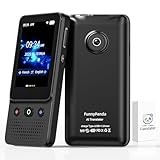
Overview: The T21 AI Language Translator Device supports 138 languages with 98% accuracy, positioning itself as a versatile travel companion for 2025. This compact unit offers both Wi-Fi and SIM card connectivity, featuring a 2.1-inch touchscreen and dual-button operation designed for users of all ages.
What Makes It Stand Out: ChatGPT integration elevates this device beyond standard translation, providing more natural conversational context. The noise-canceling microphone and high-fidelity speakers ensure clarity in busy environments, while its offline assisted mode covers 17 major languages. The 8MP camera enables photo translation across 74 languages, with 49 available without Wi-Fi.
Value for Money: At $67.59, the T21 sits in the mid-range bracket, offering competitive AI features typically found in pricier models. The combination of offline capability, photo translation, and ChatGPT support justifies the cost compared to basic translators lacking these premium functions.
Strengths and Weaknesses: Strengths include its pocketable design, dual operation modes, robust noise cancellation, and impressive photo translation capabilities. The device excels at Spanish-English translation specifically. Weaknesses are the small 2.1-inch display that may challenge visually impaired users, limited offline language selection, and the fact that offline mode is described as “supplementary” rather than primary.
Bottom Line: The T21 is ideal for tech-savvy travelers prioritizing AI-enhanced translation and portability. While the screen size compromises readability, its feature set makes it a solid choice for business trips and language learning.
7. Language Translator Device No WiFi Needed, Two-Way AI Voice Translator for All Languages, 139+ Language Online Translation,4" HD Offline/Photo Translation for Travel/Business/Study

Overview: The Winonela P40 Language Translator Device delivers 139+ language support with a sharp 4-inch HD screen, doubling the display area of traditional handheld translators. Weighing just 128g, this 2025 model promises 0.8-second response times and 98% accuracy for seamless international communication.
What Makes It Stand Out: The generous screen size significantly improves text readability and user experience without sacrificing portability. It includes practical accessories like a neck lanyard and protective case—rare additions at this price point. The device offers offline translation for 19 languages, covering more tongues than many competitors.
Value for Money: Priced at $59.99, the P40 represents exceptional value. The large display, comprehensive offline support, and included accessories make it more attractive than similarly priced models with smaller screens and fewer features.
Strengths and Weaknesses: Strengths include the bright 4-inch HD display, lightweight construction, extensive offline language library, and thoughtful packaging with lanyard and case. The 56-language photo translation capability is adequate for travel needs. Weaknesses include the absence of ChatGPT integration and slightly slower response time (0.8s) compared to premium alternatives.
Bottom Line: The Winonela P40 hits the sweet spot for budget-conscious travelers wanting a larger screen and reliable offline performance. It’s perfect for tourists and students who prioritize readability and value over cutting-edge AI features.
8. Language Translator Device No WiFi Needed, Upgraded ChatGPT Ai Translator, 150+ Languages Instant Two Way Translator Device, Offline/Recording/Photo/Voice Translation Real Time for Business Learning

Overview: This upgraded ChatGPT AI Translator supports 150+ languages with industry-leading 0.5-second response times and 98% accuracy. Designed for professionals, it combines voice, photo, and offline translation with smart recording capabilities in a feature-packed 2025 device.
What Makes It Stand Out: The lightning-fast translation speed sets it apart, while ChatGPT integration provides contextually aware interpretations. Its smart recording function captures 60 minutes of audio, making it a valuable meeting assistant. The 2000mAh battery delivers 6-8 hours of continuous use, and the 8MP camera handles photo translation in 75 languages (40 offline).
Value for Money: At $84.99, this premium device commands a higher price but delivers professional-grade features. The combination of speed, battery life, recording capabilities, and extensive language support justifies the investment for business users and frequent travelers.
Strengths and Weaknesses: Strengths include the fastest response time, largest offline language selection (21 languages), robust battery performance, ChatGPT support, and versatile recording features. The flash-enabled camera works in low light. Weaknesses are the premium pricing that may deter casual users and potentially overwhelming features for those wanting simple translation.
Bottom Line: This translator is a powerhouse for business professionals and serious travelers who need speed, reliability, and advanced features. The price is justified by its comprehensive capabilities and professional build quality.
9. GANODS Language Translator Device with 139 Languages, Real-Time Voice Text Translation, WiFi/Offline Support, 5.5-Inch Touchscreen for Travel Business Learning

Overview: The GANODS Language Translator Device features a massive 5.5-inch touchscreen—the largest in its category—supporting 139 languages and accents for real-time voice and text translation. This budget-friendly option emphasizes simplicity and accessibility for all age groups, making it particularly suitable for elderly users.
What Makes It Stand Out: The expansive HD touchscreen dramatically improves user experience, especially for elderly users or those with vision challenges. Its straightforward tap-and-speak interface eliminates learning curves. The device offers offline packs for 20 languages, covering essential travel destinations without worrying about roaming charges or signal issues.
Value for Money: At just $48.99, this is the most affordable option among comparable devices. The large screen alone provides tremendous value, making it accessible to users who struggle with smaller displays on typical pocket translators while keeping costs exceptionally low.
Strengths and Weaknesses: Strengths include the intuitive 5.5-inch display, competitive offline language support, simplicity of operation, and unbeatable price point. The real-time text subtitles enhance understanding. Weaknesses include lack of advanced features like ChatGPT, unspecified camera resolution for photo translation, and reduced portability due to its larger size.
Bottom Line: The GANODS translator excels as an entry-level device for seniors, beginners, or budget travelers prioritizing screen visibility over advanced AI features. It’s the ideal choice for those wanting maximum readability at minimum cost.
10. Language Translator Device No WiFi Needed, AI Translator with ChatGPT, Two Way Real Time Voice Translator Device with 150+ Languages, Recording/Offline/Photo Translation for Travel Business Learning

Overview: This AI Translator with ChatGPT integration delivers two-way real-time translation across 150+ languages with 0.5-second response times. The device combines individual and group communication features, making it uniquely suited for collaborative international environments and modern business needs.
What Makes It Stand Out: Revolutionary group translation mode allows creation of multilingual chat rooms where participants scan QR codes to join conversations—perfect for business meetings or group tours. The smart recording function captures 60 minutes of audio and translates across 13 source languages to 116 targets. Dual noise-canceling microphones ensure clarity in group settings and noisy environments.
Value for Money: At $84.98, this premium device matches competitor pricing while offering exclusive group features. For business professionals conducting international meetings, the collaborative capabilities provide ROI that justifies the cost over standard translators lacking team functionality.
Strengths and Weaknesses: Strengths include innovative group chat functionality, ChatGPT integration, lightning-fast translation, comprehensive photo translation (75 online/40 offline), and professional recording features. The flash-equipped camera works in dim environments. Weaknesses include a learning curve for advanced features and premium pricing that may exceed casual traveler needs.
Bottom Line: This translator is unmatched for business users and group travelers needing collaborative translation capabilities. While overkill for solo tourists, it’s an invaluable tool for international teams and professional interpreters requiring seamless multilingual communication.
How Offline Translation Technology Actually Works
Offline translation devices operate through a fascinating marriage of compressed linguistic databases and on-device processing power. Unlike their cloud-dependent counterparts, these gadgets store entire language models locally—often comprising billions of parameters condensed into downloadable language packs. The magic happens through neural machine translation (NMT) engines optimized for edge computing, which process your speech or text through multiple AI layers without sending data to external servers.
The technical architecture involves three critical components: an acoustic model for speech recognition, a translation model for language conversion, and a text-to-speech synthesizer for audio output. What separates premium devices from mediocre ones is how efficiently these components interact while respecting the memory and processing constraints of portable hardware. The best implementations use quantization techniques to reduce model size by 70-80% without catastrophic accuracy loss, though this compression inevitably creates trade-offs in nuance handling.
Why Offline Capability Matters More Than You Think
The assumption that “Wi-Fi is everywhere” crumbles quickly in real-world travel scenarios. Remote research stations, underground metro systems, airplane cabins, cruise ships at sea, and developing regions with spotty infrastructure regularly create connectivity deserts. Even in hyper-connected cities, international roaming charges, SIM card complications, and public network security risks make constant connectivity expensive and potentially dangerous.
Offline capability also delivers something cloud translation cannot: instantaneous response times. Cloud-based systems typically require 1-3 seconds for round-trip translation, while premium offline devices achieve sub-second performance. In fast-paced negotiations or emergency medical situations, those seconds matter critically. Furthermore, offline operation provides ironclad privacy—your conversations about proprietary business strategies or personal matters never leave the device, eliminating data leakage concerns inherent in cloud processing.
Key Language Pair Considerations
The language support matrix represents the most misunderstood aspect of offline translation devices. Manufacturers often advertise “50+ languages” without clarifying that only a handful support full offline functionality. Typically, major languages like Spanish, French, German, Mandarin, Japanese, and Korean receive comprehensive offline packages, while less common languages may only offer basic phrasebooks or require hybrid online-offline operation.
Bidirectional vs. unidirectional support creates another layer of complexity. Some devices excel at English-to-Japanese but stumble with Japanese-to-English due to asymmetric training data. For travelers, this matters profoundly—understanding responses is as crucial as asking questions. Investigate whether your target language pairs support full duplex offline translation, and verify if dialect variants (Mexican Spanish vs. Castilian Spanish, Brazilian Portuguese vs. European Portuguese) receive dedicated model treatment or share compressed universal models.
Understanding Translation Accuracy Metrics
Manufacturers love quoting “98% accuracy” figures, but these numbers rarely reflect real-world performance. Accuracy measurements in controlled laboratory environments using clean audio and standard dialects paint an unrealistic picture. True accuracy depends on multiple variables: background noise levels, speaker accent thickness, domain-specific vocabulary, and conversational speed.
The BLEU (Bilingual Evaluation Understudy) score represents the industry standard for translation quality, but few consumer device makers publish these metrics. A more practical evaluation involves examining how devices handle linguistic edge cases: idiomatic expressions, technical jargon, cultural context, and ambiguous pronouns. Premium devices increasingly incorporate context windows that analyze preceding conversation turns to disambiguate meaning—a feature particularly valuable for business discussions where pronoun references carry significant weight.
Voice Recognition Quality in No-Connection Environments
Speech recognition accuracy plummets without cloud support unless the device incorporates sophisticated on-device acoustic modeling. The challenge intensifies with non-native speakers whose accents deviate from training data. Top-tier devices employ speaker adaptation techniques that learn your voice patterns over time, gradually improving recognition accuracy through on-device fine-tuning.
Microphone array design fundamentally impacts performance. Beamforming technology using multiple microphones can isolate your voice from ambient noise in busy markets or crowded trains. Some devices feature directional microphones that require aiming toward the speaker, while others use omnidirectional arrays for natural conversation flow. Consider your typical usage scenarios—adventurous travelers benefit from robust noise cancellation, while business users might prioritize pickup range for conference table settings.
Text vs. Voice vs. Camera Translation Modes
Modern offline translators offer three primary input modalities, each with distinct offline implementation challenges. Voice translation remains the flagship feature but demands the most processing power. Text translation, whether typed or handwritten, generally achieves higher accuracy since it bypasses speech recognition errors. Camera translation using optical character recognition (OCR) presents the greatest technical hurdle offline—recognizing text in various fonts, sizes, and lighting conditions without cloud assistance requires substantial onboard processing.
The best devices seamlessly transition between modes based on context. For instance, capturing a menu with camera translation, then using voice mode to ask questions about ingredients. However, offline OCR accuracy varies dramatically between printed text and handwriting, with most devices struggling significantly with the latter. Some manufacturers include a “learning mode” where you can train the device to recognize your handwriting style, improving accuracy for note-taking and form-filling scenarios.
Storage Capacity and Language Pack Management
Language packs range from 150MB for compact phrasebook-style models to 2GB+ for comprehensive neural translation engines supporting multiple dialects and domains. A device advertising 32GB internal storage might only allocate 8-10GB for user content after system files and pre-installed languages consume the remainder. This limitation becomes critical for polyglots or regional explorers needing multiple language pairs simultaneously.
Effective language pack management tools separate premium devices from basic models. Look for features like incremental updates that only download changes rather than full pack replacements, compression options that sacrifice some accuracy for space savings, and intelligent caching that retains recently used language data while archiving less frequently used packs to cloud storage. Some devices allow microSD expansion, though accessing languages from external storage may introduce slight loading delays.
Battery Life Realities for Travel Scenarios
Manufacturers’ battery life claims rarely reflect actual usage patterns. A device rated for “10 hours of continuous translation” might achieve that in ideal conditions—moderate volume, intermittent use, room temperature environment. Real travel scenarios tell a different story: extreme temperatures, constant use during full-day tours, bright screen settings for outdoor visibility, and frequent mode switching all drain power exponentially.
Battery degradation over time presents another consideration. Lithium-ion batteries lose 20-30% capacity after 500 charge cycles, roughly equivalent to two years of heavy travel use. Devices with non-replaceable batteries effectively become disposable after this period. Power users should prioritize devices with 15+ hour realistic battery life, fast charging capabilities (full charge in under 2 hours), and power banks that support pass-through charging, allowing simultaneous device operation and recharging.
Hardware Durability and Build Quality
Travel technology must survive drops, spills, dust, and temperature extremes. IP ratings (Ingress Protection) provide standardized durability metrics—IP67 indicates dust-tight protection and water submersion resistance up to 1 meter for 30 minutes. However, these ratings don’t guarantee impact resistance. Premium devices incorporate reinforced corners, Gorilla Glass screens, and shock-absorbing internal frames.
Weight and form factor create portability trade-offs. Ruggedized devices often exceed 200 grams, while ultra-portable models under 100 grams may sacrifice battery capacity and speaker quality. Screen size affects usability—3-inch displays work for basic translation but strain eyes during extended camera translation sessions. Consider button placement for one-handed operation, especially when juggling luggage or maps. Haptic feedback quality also matters; subtle vibrations confirming translation completion prove invaluable in noisy environments where audio cues go unnoticed.
User Interface and Accessibility Features
Intuitive UI design becomes paramount when you’re stressed, jet-lagged, and struggling with language barriers. The best offline translators feature one-tap conversation modes that automatically detect language direction, large touch targets for gloved hands in cold climates, and customizable shortcut buttons for frequently used phrases. Dark mode interfaces conserve battery and reduce eye strain during nighttime use.
Accessibility features extend beyond basic usability. Screen reader compatibility for visually impaired travelers, high-contrast modes for low-vision users, and simplified interfaces for elderly travelers who didn’t grow up with smartphones demonstrate thoughtful design. Some devices offer companion smartphone apps for complex setup tasks while keeping core translation functions device-native, providing the best of both worlds—easy configuration and robust offline operation.
Privacy and Security Implications
Offline operation inherently provides better privacy than cloud services, but vulnerabilities still exist. Devices that sync translation history to companion apps create potential data leakage points. Investigate whether the device stores conversation logs locally in encrypted formats and whether you can set automatic deletion timers. Some business-oriented devices offer secure wipe functions that erase all data with a specific button combination—essential for corporate travelers handling sensitive negotiations.
Firmware update security presents another consideration. Updates delivered over unsecured connections could introduce malware. Reputable manufacturers cryptographically sign firmware packages and provide detailed changelogs. Be wary of devices requiring excessive permissions for companion apps or those without clear privacy policies specifying data handling practices. Remember: “offline capable” doesn’t automatically mean “privacy focused.”
Price vs. Performance Trade-offs
The offline translation device market spans from $50 basic models to $400+ premium units. Budget devices typically use older statistical machine translation models rather than modern neural networks, resulting in robotic, context-blind translations. They may support fewer languages offline and lack advanced features like camera translation or voice adaptation. However, for casual travelers sticking to tourist zones in major languages, these limitations might prove acceptable.
Mid-range devices ($150-$250) represent the sweet spot for most users, offering modern NMT engines, robust offline language support for 10-15 major languages, and decent hardware durability. Premium devices justify their cost through superior accuracy, extensive language coverage (30+ languages fully offline), professional features like presentation mode for conferences, and build quality that survives years of adventure travel. Calculate cost-per-use based on your travel frequency—a $300 device used on 30 trips costs $10 per journey, far less than hiring interpreters or dealing with miscommunication costs.
Hidden Costs and Subscription Models
Beware the subscription trap. Some manufacturers subsidize device costs with mandatory subscription fees for language updates, premium features, or access to specialized domain packs (medical, legal, technical). These recurring charges can transform a seemingly affordable device into a long-term financial burden. Always verify whether language pack updates remain free for the device’s lifetime and whether core functionality requires active subscriptions.
Data roaming charges for companion app features represent another hidden cost. Some devices require initial online activation or periodic license verification, potentially triggering international roaming fees. Investigate offline-first setup procedures and whether the device functions indefinitely without ever connecting to the internet. Additionally, factor in accessory costs—protective cases, screen protectors, spare charging cables, and international power adapters can add 15-20% to the total investment.
Integration with Other Travel Tech
Offline translators shouldn’t exist in isolation. Bluetooth connectivity allows pairing with wireless earbuds for discreet conversations and hearing assistance scenarios. Some devices function as Bluetooth speakers for your smartphone, letting you maintain offline translation capability while using your phone for navigation or photography. USB-C connectivity enables direct connection to laptops for real-time meeting translation without software installation.
Consider how the device fits your broader tech ecosystem. Does it charge from the same power bank as your phone? Can you export translation history to travel journaling apps? Does it support dual-SIM functionality for travelers carrying both home and local numbers? The most versatile devices offer APIs for developers, allowing integration with custom travel apps or accessibility tools, though this remains a niche feature for most consumers.
Future-Proofing Your Investment
Technology evolves rapidly, and translation devices risk obsolescence within 2-3 years. Future-proofing strategies include choosing devices with over-the-air update capabilities (even if used sparingly), modular language systems that allow adding new languages without hardware replacement, and manufacturers with proven track records of supporting legacy devices. Some companies offer trade-in programs when releasing new models, providing upgrade paths.
Artificial intelligence advancements promise on-device learning capabilities where devices improve by analyzing your usage patterns locally. This emerging feature could dramatically extend device relevance. Also consider emerging connectivity standards—devices with eSIM support might offer optional low-cost data plans for hybrid online-offline operation without traditional SIM card hassles, providing flexibility for changing travel patterns.
Troubleshooting Common Offline Issues
Even premium devices encounter offline glitches. Speech recognition failures in noisy environments often resolve by switching to text mode or using the device’s “quiet environment” setting that adjusts noise cancellation parameters. Translation accuracy degradation may indicate corrupted language packs—most devices include diagnostic tools to verify pack integrity and re-download if necessary without full replacement.
Unexpected battery drain frequently stems from background processes like continuous listening mode. Disable always-on voice activation when not needed. Devices freezing during translation might suffer from insufficient available memory—regularly clear translation history and temporary files. If camera translation fails in low light, manually activate the device’s LED light rather than relying on auto-adjustment, which can cause OCR algorithms to struggle with high-contrast shadows.
Maintenance and Language Update Strategies
Language evolution means your device requires periodic updates to handle new slang, changed place names, and emerging terminology. The best maintenance strategy involves updating language packs during pre-travel preparation at home with reliable Wi-Fi, ensuring you have the latest versions before departure. Some devices support delta updates that only download changes, reducing update time and storage impact.
Create a pre-trip checklist: verify all needed language packs are downloaded and current, run diagnostic tests, fully charge the device and power banks, and test core functionality. Store emergency phrases in favorites for quick access during high-stress situations. Consider backing up your device’s configuration to a companion app (if available) so you can restore settings quickly if the device fails or gets lost. For extended trips, schedule monthly check-ins to download any critical updates when you encounter secure Wi-Fi.
Frequently Asked Questions
Can offline translation devices really understand regional accents and dialects?
Premium devices increasingly include accent adaptation features that learn your speech patterns over time. For major languages like Spanish, French, or Arabic, many devices offer distinct language packs for regional variants (e.g., Mexican Spanish vs. Argentine Spanish). However, heavy dialectal variation still challenges even the best offline systems. For niche dialects, consider devices that allow custom vocabulary training where you can record and assign translations for locally specific terms.
How many languages can I realistically store on one device?
This depends entirely on storage capacity and language pack sizes. A 32GB device typically accommodates 8-12 full-featured language pairs (including bidirectional translation and camera OCR) while retaining room for system operation. If you only need basic phrasebook functionality, you might store 30+ languages. Power users should prioritize devices with 64GB+ storage and microSD expansion for true multilingual capability across extensive travel itineraries.
Will my offline translator become obsolete when new AI models are released?
Device obsolescence is a valid concern. Most manufacturers support hardware for 3-5 years with language pack updates, though major AI architecture improvements may require new hardware. Look for companies with strong software update track records and modular architectures that can accommodate newer NMT versions. Some premium devices now feature “AI upgradeable” components where core translation engines can be replaced via major firmware updates, extending functional lifespan.
What’s the difference between offline translation devices and offline smartphone apps?
Dedicated devices offer superior microphones optimized for noisy environments, single-purpose batteries lasting days rather than hours, and hardware buttons for instant access without unlocking screens. They also eliminate smartphone distractions and reduce security risks from connecting to foreign networks. However, smartphone apps leverage more powerful processors and larger screens. The choice depends on your priorities: convenience and integration (smartphone) versus reliability and specialization (dedicated device).
Can I use an offline translator for business legal document review?
Proceed with extreme caution. While offline translators handle general business conversation adequately, legal document translation demands specialized domain training that most consumer devices lack. Some professional-grade devices offer legal language packs as paid add-ons, but even these serve for gist understanding rather than definitive interpretation. For binding agreements, always use certified human translators. Think of offline devices as “communication assistants” not “legal interpreters.”
How do I handle languages with different writing systems, like Chinese or Arabic?
Quality devices render character-based languages through vector font systems that scale smoothly for camera translation. For Arabic’s right-to-left script and contextual letter forms, ensure the device specifically advertises full bidirectional support. The best implementations include stroke-order recognition for handwritten Chinese characters and diacritical mark handling for Arabic. Test camera OCR on sample texts before traveling, as some devices struggle with calligraphic fonts common in signage.
What happens if my device breaks while I’m traveling in a remote location?
Prevention is your best strategy. Carry a rugged device, use protective cases, and pack a backup solution like a phrasebook app on your phone. Some manufacturers offer international warranty service with courier pickup, though this takes days. Consider devices with user-replaceable batteries and standard USB-C charging, making them easier to service locally. Travel insurance covering electronics can reimburse emergency purchases of replacement devices abroad.
Are there any restrictions on using translation devices in certain countries?
Some nations restrict importing devices with encryption capabilities or GPS functionality. China, Russia, and several Middle Eastern countries have specific regulations about electronic devices. Generally, consumer translation devices face few issues, but business travelers should check corporate compliance policies and local laws. Devices with removable SIM cards or eSIM capabilities may trigger customs scrutiny. Carry purchase receipts and manufacturer compliance documentation for high-value units.
How accurate is the camera translation feature for handwritten text?
Offline OCR accuracy for handwriting remains significantly limited compared to printed text. Most devices achieve 60-75% accuracy on clear block handwriting but struggle with cursive or stylized scripts. Some premium models include handwriting learning modes where you can train the system on specific handwriting styles, improving accuracy for forms filled out by regular contacts like hotel staff or tour operators. For critical handwritten information, always verify through voice or text translation when possible.
Can children or elderly travelers effectively use these devices?
Many manufacturers now include simplified modes with larger icons, voice-guided tutorials, and emergency phrase shortcuts. Devices with physical buttons often prove easier for elderly users unfamiliar with touchscreens. For children, look for educational modes that gamify language learning and parental controls preventing accidental purchases or settings changes. The key is pre-travel practice—spend time learning the interface before departure to reduce stress during actual use.'